
How Search Engines Understand Search Queries: Intent, Context and Meaning
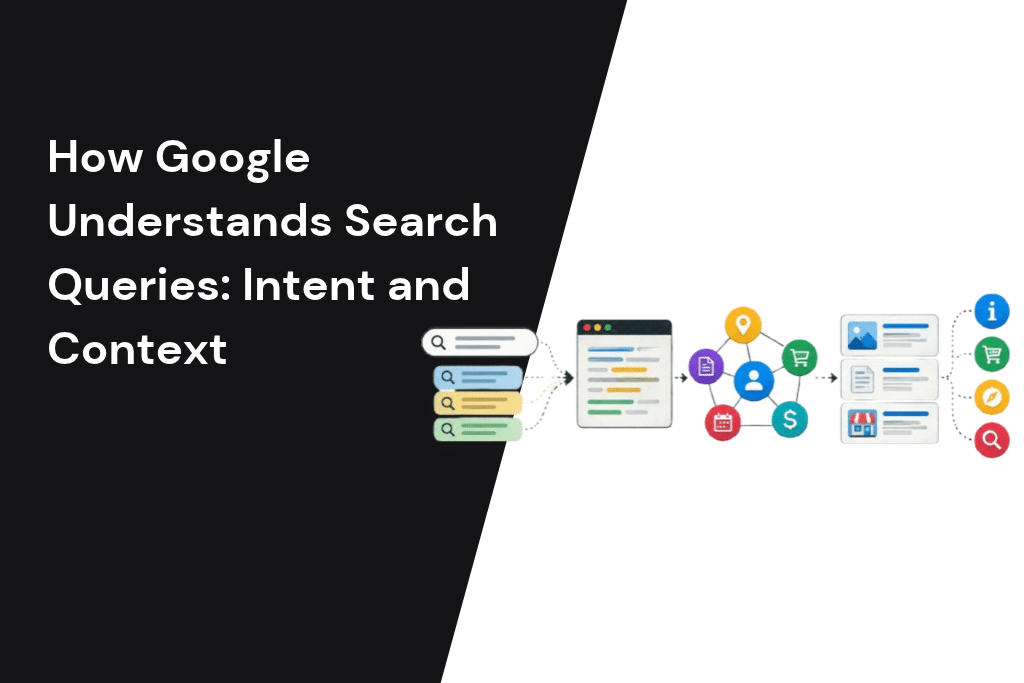
Someone in Business Bay types “seo dubia price” into Google on their phone. Before a single page is ranked, Google has already fixed the spelling, worked out that “dubia” means Dubai, recognised that “price” signals someone close to buying, and applied their location. The results they see are shaped by all of that.
Most SEO advice starts at ranking. This guide starts one step earlier, with the query itself. Once you understand what Google does to a search before it looks at your page, you can see why some pages rank for the “wrong” searches and why two people get different results. You can also write content that matches what people actually mean. For the wider picture of how search works, start with our guide to what SEO is and how it works for businesses in Dubai and Abu Dhabi.
Search engines interpret a query by analysing its wording, correcting likely spelling errors, identifying important terms and entities, inferring search intent, and using contextual signals such as location, device and recent search activity where available. For example, when someone searches for “seo dubia price,” Google may interpret “dubia” as “Dubai,” recognise SEO as the service being sought and infer that “price” indicates commercial investigation. It can then retrieve relevant pages that discuss SEO services and pricing in Dubai, before ranking them according to relevance and other search-quality signals. This process helps explain why search engines do not rely on exact keyword matches alone and why businesses should create content that addresses users’ actual needs, questions and context. Understanding query interpretation is an important foundation for SEO because content that aligns with search intent is more likely to be relevant to the searches a business wants to attract.
How does Google understand search queries?
Google understands a search query before it ranks a single page. It corrects spelling, breaks the query into words and entities, works out the intent, and adds context such as location and language. AI systems like BERT and neural matching then match the meaning of the query, not just its exact words. Google may also rewrite or expand the query to find better answers.
Google itself lists the meaning of your query as the first key factor in how it ranks results. Relevance, quality and usability all come after Google has decided what you are asking. That order matters for anyone creating content: if Google reads the query one way and your page answers it another way, the quality of the page barely matters.
Search query vs keyword: what Google actually receives
A keyword and a search query sound like the same thing, but they are not.
| Keyword | Search query | |
|---|---|---|
| Who creates it | Marketers and SEO tools | The person searching |
| What it looks like | Clean, grouped, often short (“seo dubai”) | Messy, specific, often long (“how much does seo cost for a small cafe in jlt”) |
| Spelling | Correct | Often misspelled or mixed language |
| Purpose | Planning and reporting | Getting an answer |
| What Google works with | Never sees it directly | Processes every one |
Google never sees your keyword list. It sees millions of individual queries, written in every possible way. Google has said that 15% of the searches it sees every day are new, and its Search Advocate John Mueller repeated the figure at Search Central Live in 2025. No keyword list can cover searches that have never happened before.
This is why Google cannot rely on matching the exact words in a query to the exact words on a page. It has to work out what each query means. The steps below show how.
The query pipeline: how Google processes a search in 6 steps
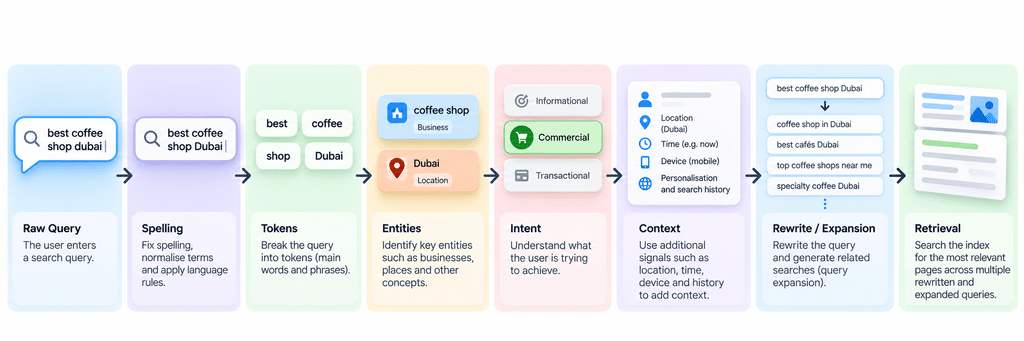
When a query arrives, Google works on it before any ranking happens. The six steps below are a simplified model built from Google’s documentation and public explanations, not an official Google diagram. In plain terms:
- Spelling correction: Google fixes typos and suggests what you meant.
- Parsing: the query is broken into words and meaningful phrases.
- Entity recognition: Google identifies the real things in the query, such as places, brands and products.
- Intent classification: Google works out what kind of answer the person wants.
- Context: location, language, device and timing are added.
- Rewriting and expansion: Google adds synonyms and related searches to find the best matches.
Step 1: Spelling correction
Around one in ten queries Google receives every day is misspelled. In 2020 Google introduced a deep neural network for spelling that it said improved its ability to decipher misspellings more than all its spelling updates from the previous five years. This is where “dubia” becomes “Dubai” and you see the “Did you mean” or “Showing results for” message.
For UAE businesses this matters more than usual. Area names, brand names and Arabic words written in English letters are spelled in many ways: Jumeirah, Jumeira, Jumairah. Google usually works out the intended place, but your page should still use the most common spelling in headings and text.
Step 2: Parsing the query into words and phrases
Next, Google splits the query into tokens and groups words that belong together. “Business setup in free zone Dubai” is not six separate words. “Business setup” is one concept and “free zone” is another. Small words like “in” and “for” are handled carefully too, because sometimes they change the meaning completely. A flight “from Dubai to London” is not the same as one “from London to Dubai”.
Step 3: Entity recognition
Google then identifies the entities in the query: the real-world people, places, organisations and things it knows about, often connected to its Knowledge Graph. In “Emirates baggage allowance to London”, Google recognises Emirates as the airline, not the seven emirates, and London as a destination city.
This is why clear entity signals on your own pages help. Say exactly what your business is, where it operates and what it offers. That makes it easier for Google to connect your page to the entities in a query.
Step 4: Intent classification
With the words and entities understood, Google works out what kind of result would satisfy the person. Is this someone looking for information, a specific website, a comparison, or ready to buy? Intent shapes the whole results page. Search “seo dubai” from the UAE and you get ads, a local pack of agencies and service pages. Search “what is seo” and you get an AI Overview, definitions and long guides. Same topic, two different jobs.
Google’s own Search Quality Rater Guidelines describe this as “Needs Met”: how well a result satisfies what the searcher actually wanted.
We cover the types of intent in detail in our guides to the types of search intent and informational, navigational and transactional queries, so here the key point is simple: Google decides intent from the query and from how people have responded to similar searches, not from what your page wants to rank for.
Step 5: Adding context
Google adds context the query itself does not contain. The biggest factors are location, language settings, device and timing. We look at each in the next section, because context is the reason two people can search the same words and get different results.
Step 6: Rewriting and expansion
Finally, Google may adjust the query to find better matches. It can add synonyms (“cheap” and “affordable”), related terms, or alternative phrasings. In AI Mode it goes further and breaks a question into many smaller searches, which we cover in its own section below.
After these six steps, Google has a far richer picture than the words typed.
Why two people see different results for the same search
A common frustration we hear from clients: “I searched our main service and we’re on page one, but my colleague sees us on page two.” Both can be true. Google applies context differently for each person.
Location: Dubai is not Abu Dhabi
For any search with local intent, location is one of the strongest factors. A search for “physiotherapy clinic” in Dubai Marina returns different clinics from the same search in Khalifa City. Even a query with no place name, like “car service near me”, is shaped by where the phone is. This is why local businesses need strong local SEO in Dubai and an accurate Google Business Profile.
Language and settings
The language of your device and Google account affects which results you see. In the UAE, where many people use both English and Arabic, someone whose phone is set to Arabic and laptop to English can see different results on each.
Device
Mobile and desktop results can differ. On a phone, Google leans harder on location, so local packs and nearby businesses show up more often. Check your important queries on a phone, not just on your office laptop.
Freshness
For some queries Google favours recent content. Google runs freshness systems for this, which SEOs often call “query deserves freshness”. A search about a new visa rule, a public holiday date or Dubai Shopping Festival is likely to show recently published pages. A search about a long-established topic is not.
Search history and personalisation
Google uses some personal signals, such as previous searches. Google has said it uses location, past search history and settings to decide what is most relevant. In practice, location, language and device explain most of the differences business owners notice. That is why checking rankings from your own browser is a weak way to measure performance, and why Search Console data, which averages across real searchers, is more reliable.
The way people think when they search also shapes these results, which we explore in our article on search intent psychology.
The AI systems behind query understanding
Google has built several AI systems over the past decade to understand language. They are often described as if each replaced the last. In reality, they work together, and some are used for specific tasks rather than general ranking.
| System | Launched | What it does | Status today (per Google) |
|---|---|---|---|
| RankBrain | 2015 | Google’s first deep learning system in Search. Helps connect words to concepts, so a query can match pages that use different words. | Still listed in Google’s ranking systems guide |
| Neural matching | 2018 | Understands how queries relate to pages by matching broader concepts. | Still listed |
| BERT | 2019 | Understands how combinations of words change meaning, including small words like “for” and “to”. At launch it helped with one in ten US English searches. | Still listed |
| MUM | 2021 | A multilingual, multitask model Google described as 1,000 times more powerful than BERT, trained across 75 languages. | Used for specific applications, not general ranking |
| Gemini in Search | 2025 | A custom version of Gemini 2.5 writes answers in AI Mode and AI Overviews. | Used in AI Mode and AI Overviews (US launch, May 2025) |
| AI Mode query fan-out | 2025 | Breaks one question into many searches run at the same time. | Used in AI Mode |
Google explained in 2022 that RankBrain and neural matching work alongside BERT and MUM, each handling a different part of understanding. The practical point for content creators is the same across all of them: Google matches meaning, not word counts. Writing naturally and covering a topic properly works better than repeating a phrase. This is the difference between keyword (lexical) search, which matches the exact words, and semantic search, which matches what the words mean. Google does both, but meaning now carries most of the weight.
If you want to understand how these language models work underneath, our plain-English guide to how large language models work covers the basics.
Query rewriting, expansion and AI Mode query fan-out
Query rewriting is when Google adjusts a query to find better results. Query expansion is when it adds related terms. Both have been part of Search for years. What is new is the scale.
In 2025 Google confirmed that AI Mode uses a query fan-out technique: it breaks a question into subtopics and runs many searches at once on the user’s behalf. Take a question like “best area in Dubai for a family moving from London with a budget of 150,000 AED rent”. It might become separate searches about schools, commute times, rental prices, community feel and parks.
This changes what “ranking” means. Your page might never rank for the long question someone typed. It can still be pulled into the answer if it ranks well for one of the smaller searches Google created. That is why pages that answer a specific sub-question clearly, in a self-contained section, are more likely to be used.
We go deeper on this in query fan-out in Google AI Mode and explain how the final answer is assembled in how Google AI Overviews work.
Autocomplete, “Did you mean” and query refinements
Google influences many queries before the person finishes typing.
Autocomplete predicts what you are typing based on common and trending searches, your location and your previous searches. Google has explained that these predictions reflect real searches, and it removes predictions that break its policies. Type “dentist in” from Dubai and you will see suggestions for specific Dubai areas, because that is what people nearby search.
“Did you mean” appears when Google thinks a query is misspelled. If it is confident, it shows the corrected results straight away and offers a link back to your original spelling.
Refinements and related searches appear as “People also ask” questions and suggested searches. They show how Google expects a search to develop.
For content planning, these features are free research. Autocomplete shows how people phrase a topic. People also ask shows the follow-up questions they have. If your page answers the main query and the obvious follow-ups, it matches how the search journey actually unfolds.
Long and conversational queries
People increasingly search in full sentences. Voice search, AI assistants and AI Mode all encourage this. Instead of “trade licence dubai”, people ask “what’s the best way to get a trade licence for a small online business in Dubai”.
Long queries carry more intent. Google can understand them because systems like BERT read the relationship between all the words, not just the important-looking ones. For businesses, this has three consequences:
- Exact-match pages are less important. You do not need a separate page for every phrasing. One strong page that answers the topic fully can match many variations.
- Clear answers win. A long question deserves a direct answer near the top of a section, followed by the detail.
- Specifics matter. Conversational queries often include budget, location, business size or timeframe. Content that addresses these details matches better than generic copy.
AI tools handle these questions differently from classic search, which we compare in LLMs vs search engines. If voice and conversational search are a priority for your business, our voice search optimisation service is built around exactly this shift.
Arabic, Arabizi and mixed-language queries in the UAE
This is the part most guides to query understanding skip, and it matters a great deal in the UAE. People here search in at least three ways, often for the same need.
Modern Standard Arabic and Gulf dialect
Formal Arabic (Modern Standard Arabic) and Gulf dialect use different words for everyday things. A page written only in formal Arabic may miss how people actually type a search on their phone. Google’s language models are trained across many languages, but your page still needs to use the words your customers use.
Arabizi: Arabic in English letters
Many people type Arabic words using English letters and numbers, known as Arabizi. For example, the number 3 stands for the Arabic letter ع and 7 for ح. A search might mix Arabizi with English. These queries are inconsistent by nature, because there is no single agreed spelling.
Mixed Arabic and English
UAE searches often switch language mid-query, for example an English brand name followed by Arabic words, or an Arabic question with an English product term.
| Same need, three ways | Example query |
|---|---|
| English | car rental dubai monthly |
| Arabic | تأجير سيارات دبي شهري |
| Arabizi | ta2jeer sayarat dubai shahri |
These three searches express the same need, but they do not always return the same results. Run your own most important searches in all three forms and compare what ranks. If fewer strong pages compete in Arabic for your topic, that gap is an opportunity worth testing.
What this means for your site:
- Build proper Arabic pages based on Arabic keyword research, not just translated English pages.
- Use the terms your customers use, including common dialect words, where it suits your brand.
- Connect your English and Arabic pages correctly with hreflang so Google shows the right version.
Getting this right is specialist work. Our international and multilingual SEO team handles Arabic and English sites for UAE and GCC brands.
Why Google ranks your page for the “wrong” queries, and how to spot it in Search Console
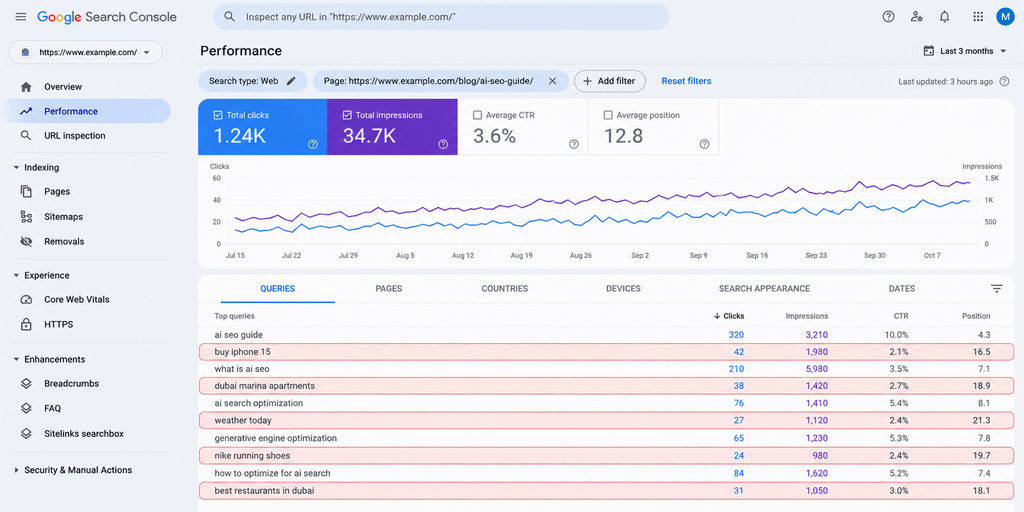
Sometimes Search Console shows a page getting impressions for searches that have nothing to do with its purpose. A service page for corporate law might appear for “free legal advice”, or a product page for “how does it work” questions. This is Google telling you how it has read your page and the queries around it.
Here is how to check, step by step:
- Open the Performance report in Google Search Console and set the date range to the last three months.
- Filter by page. Add a filter for the exact URL you want to check.
- Open the Queries tab and sort by impressions.
- Read the top 20 queries and ask one question for each: would someone searching this be happy landing on this page?
- Group the mismatches. Common patterns are informational queries landing on a service page, a different location from the one you serve, or a different product or service than the page offers.
- Decide on a fix for each group (see the table below).
| What you see | What it usually means | What to do |
|---|---|---|
| Lots of “what is” and “how to” queries on a service page | Google sees informational intent | Create a separate guide and link it to the service page |
| Queries for a location you don’t serve | Weak or missing location signals | Make your service area clear in text, headings and your Business Profile |
| Queries for a service you don’t offer | The page mentions it in passing | Tighten the copy or create a dedicated page if you do offer it |
| Two of your pages getting the same queries | Pages competing with each other | Merge them or give each a clearly different focus |
This is also the most common reason behind a frustrating pattern: traffic arrives but nobody converts. The page is ranking for searches it was never built to answer.
If the patterns are hard to untangle, an SEO audit maps every page against the queries it attracts and finds the conflicts.
What this means for your content plan: 6 practical checks
Understanding how Google processes queries changes how you plan and write. Use these six checks on any important page:
- Match the intent of the results page. Search your main query and look at what ranks. If the top results are guides, a sales page will struggle, and the reverse is also true.
- Answer the main question early. Put a clear, direct answer in the first few lines of the page or section, then add detail.
- Name your entities clearly. Say exactly who you are, what you offer and where you operate. Don’t make Google guess.
- Cover the follow-up questions. Use People also ask and autocomplete to find the next questions people have, and answer them on the page or on linked pages. [EDITOR: link our keyword research guide (/blog/keyword-research-uae/) here once it is live]
- Write for every language your customers search in. If your customers search in Arabic, you need real Arabic content, not only a translation.
- Check Search Console every quarter. Look for queries that don’t fit each page’s purpose and fix them before they become a pattern.
These checks sit on top of the technical basics. If Google can’t crawl and index a page, none of this matters, which is covered in our guides to how search engines crawl, index and rank content and how search engines store and retrieve information. When you are ready to turn these checks into content, our SEO content and copywriting team writes pages built around how people actually search.
Frequently asked questions
Why does Google ignore some of the words I searched?
When no page matches every word in a long query, Google shows the best matches it can find, which may not include every term. It also treats some words as less important to the meaning. If a word is essential, put the query in quotation marks to tell Google to include it.
Does Google show everyone the same results?
No. Results change with location, language, device and timing, and to a smaller degree with search history. Two people in different parts of the UAE can see different results for the same words, especially for local searches.
How does Google autocomplete work?
Autocomplete predicts your search from common and trending searches, adjusted for your location and your own past searches. Google removes predictions that break its policies. The suggestions show how real people phrase a topic, which makes them useful for content research.
Is RankBrain still used by Google?
Yes. RankBrain is still listed in Google’s guide to its ranking systems, alongside neural matching and BERT. These systems work together rather than replacing each other.
Does Google understand Arabic written in English letters?
Google can often understand Arabizi and mixed-language searches, but results vary because spellings are inconsistent. The safest approach is to have proper Arabic content on your site and check how your key searches perform in Arabic, English and Arabizi.
How long can a Google search query be?
Google limits a query to 32 words and ignores anything after that. Most searches are far shorter, but conversational and AI Mode questions are getting longer.
How does Google know what I want to search?
It does not read minds. It predicts from what you have typed so far, what other people searched after similar words, and context such as your location and past searches. Then it checks the spelling, entities and intent of the finished query before showing results.
What is the difference between a search and a query?
A query is the exact text someone types or speaks. A search is the whole process that follows, from Google understanding the query to showing results. Understanding the query is the first and most important step in every search.