
Multilingual SEO for UAE and GCC Websites: Ranking in Arabic and English Without Duplication
Multilingual SEO is the work of making each language version of a website rank on its own. For UAE and GCC sites, that usually means Arabic and English pages on separate URLs, linked with hreflang tags, each with its own canonical. Each version should come from its own keyword research. It should not be a word-for-word translation.
Many bilingual sites get at least one of these steps wrong. The signs are an Arabic section with almost no traffic, English pages showing up for Arabic searches, or Arabic pages hidden from Google out of fear of “duplicate content”.
This guide explains how Google handles language versions, based on its own documentation. It then covers the decisions that matter for multilingual SEO in the UAE: which languages you need, how to structure the site, how to set up hreflang, and when Saudi Arabia needs its own pages. If you are new to the basics, start with our guide to what SEO is and how it works in Dubai and Abu Dhabi.
What is multilingual SEO?
Short answer: Multilingual SEO means optimising two or more language versions of a site so each one ranks for searches in its own language. It covers site structure, hreflang, canonicals and separate keyword research for each language.
It is close to international SEO, but not the same thing. International SEO is about countries. Multilingual SEO is about languages. A UAE site with Arabic and English pages is a multilingual site. A site with separate pages for the UAE and Saudi Arabia is a multi-regional site. Many GCC businesses do both, which is why the two terms get mixed up.
The goal is simple. An Arabic speaker in Abu Dhabi should land on your Arabic page, and an English speaker in Dubai Marina should land on your English page. The two pages should not compete with each other.
Do you actually need Arabic?
Not every UAE business needs an Arabic site. Decide by who buys from you and what they search for, not by location alone.
The UAE is not a typical Arabic-speaking market. Global Media Insight puts the population at about 11.57 million as of October 2026, with expatriates making up about 88.5% and Emirati nationals about 11.5%. Its estimates put Indian and Pakistani nationals at about 38% and 17% of the population. English is the shared business language for much of that mix.
So the answer depends on your audience:
- Government, semi-government and B2B suppliers to those bodies usually need Arabic.
- Healthcare, education, real estate and legal services often get real Arabic demand from Emiratis, Saudis and Arab expats.
- Businesses that sell across the GCC usually need Arabic to reach buyers in Saudi Arabia, Kuwait, Qatar, Bahrain and Oman.
- Some niche B2B and expat-focused services may get very little Arabic search. Check before you build.
Language does affect buying. In CSA Research’s 2020 “Can’t Read, Won’t Buy” survey of 8,709 consumers in 29 countries, 39% said they prefer to buy on sites in their own language. 66% chose the product that had information in their language, and 75% were more likely to buy again if customer care was in their language.
There may also be less competition in Arabic. W3Techs reports that Arabic is used by 0.6% of all websites whose content language it knows. That is a share of websites, not of search results, but in many niches the Arabic results are thinner. Check the live results for your own keywords.
The way to decide is with data. Run Arabic keyword research for your main services and look at real search volumes. Our step-by-step guide to keyword research for UAE businesses shows how to tie those keywords to revenue.
How Google chooses which language version to show
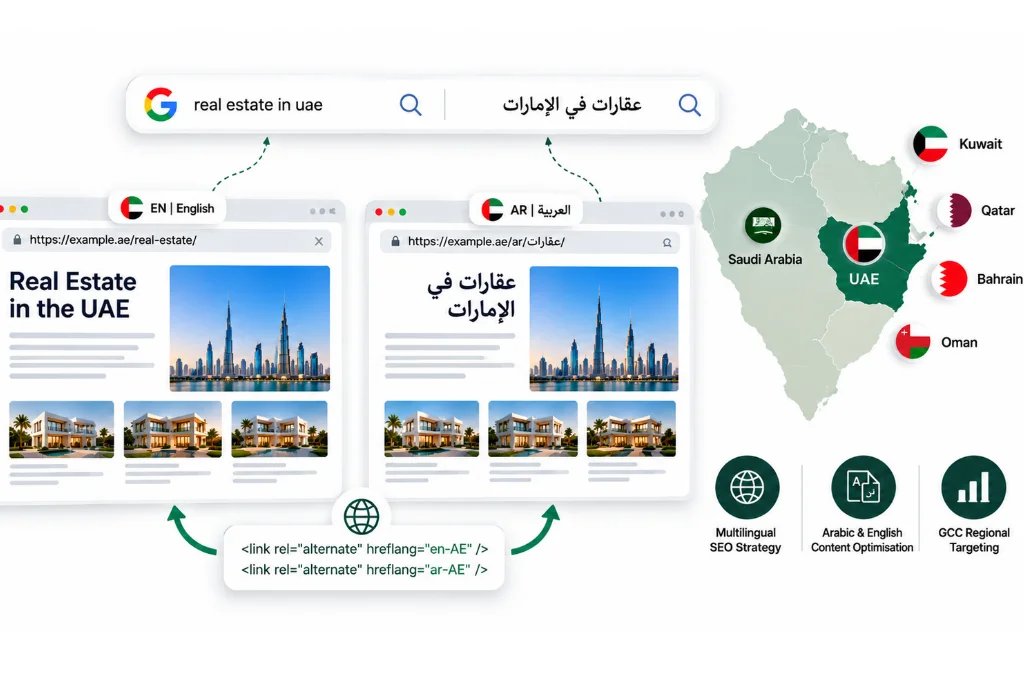
Google works out a page’s language from its visible text, not from the code or the URL. It uses hreflang to show the right version to each searcher, and it does not want you to redirect people by IP address.
This is where most multilingual problems start. Here is what Google says in its guide to managing multi-regional and multilingual sites:
- Visible content decides the language. Google says it uses “the visible content of your page to determine its language.” It does not use the lang attribute or the URL. An Arabic page with a mostly English menu and footer sends a mixed signal.
- Hreflang connects the versions. It does not tell Google what language a page is in. It tells Google which pages are versions of each other.
- Do not redirect by IP or language. Google advises against automatic redirects between language versions. It also says, “Don’t use IP analysis to adapt your content.”
The reason for that last point is how Googlebot crawls. Google’s page on locale-adaptive pages says Googlebot’s default IP addresses appear to be in the USA. It also sends requests without an Accept-Language header. If your site sends US visitors to English, Google may never see your Arabic pages. Give each version its own URL and let people switch with a clear language switcher.
One more change worth knowing: the old International Targeting report in Search Console is gone. Google’s Search Console Help page says the report has been deprecated, but Google “will continue to support and use hreflang tags.” Hreflang and a clear site structure now do that job.
For the wider picture, see our guide to how search engines crawl, index and rank content.
Arabic demand is not a translation of English demand
Arabic searchers often use different words, dialects and spellings from a direct translation of your English keywords. Research Arabic keywords from scratch, then map them to pages.
Here is what makes Arabic search different:
- Formal and Gulf Arabic. Most business content is written in Modern Standard Arabic. Gulf searchers often type Gulf (Khaleeji) words, and Egyptian and Levantine expats bring their own dialects. Your page should read well in standard Arabic and still match the words people search for.
- Spelling variants. Searchers often skip the hamza or swap a taa marbuta for a haa. For example, “عيادة أسنان” (dental clinic) is often typed as “عياده اسنان”. Google handles many variants, but your research should show which form people use most.
- Arabizi and mixed queries. Some users type Arabic in Latin letters, or mix Arabic and English in one search, such as “seo في دبي” (SEO in Dubai). Brand and product names are often searched in English, even by Arabic speakers.
- Different intent. The English searcher may be comparing prices, while the Arabic searcher wants a provider nearby. Our guide to the types of search intent explains how to read this.
So your Arabic and English pages may not line up one to one. An Arabic page may need a different focus keyword, heading or structure from its English twin. That is fine, as long as both pages cover the same offer and link to each other with hreflang.
Choosing a site structure: subfolder, subdomain or ccTLD
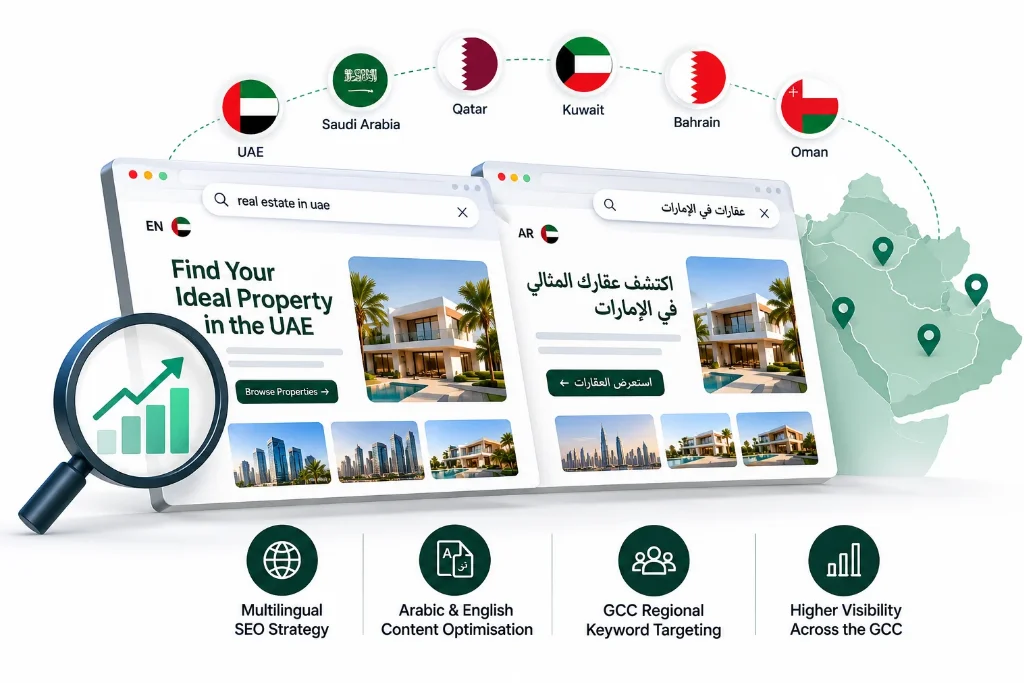
For most UAE businesses, language subfolders on one domain (such as /en/ and /ar/) are the simplest and strongest choice.
Google’s documentation lists four options. Here is how they compare for a UAE business:
|
Structure |
Example |
Good for |
Watch out for |
|
Subfolders |
example.com/ar/ |
Most UAE and GCC sites. Easy to set up, and one domain builds authority for all languages |
Needs a CMS that handles languages and RTL well |
|
Subdomains |
ar.example.com |
Teams that need separate hosting or platforms per language |
Can mean building signals for each subdomain separately |
|
Country domains |
example.ae, example.sa |
Brands with a real, separate operation in each country |
More cost and upkeep, and each domain builds authority from scratch |
|
URL parameters |
example.com?lang=ar |
Nothing. Google does not recommend them |
Hard to manage and easy to get wrong |
A .ae domain works fine for a UAE business. The real question is whether you need a separate domain for each country, and most businesses do not. If you already run a .ae site and want Saudi traffic, you can add Saudi sections in subfolders. Whatever you pick, use the same pattern across the whole site.
Hreflang for UAE and GCC sites: a working example
Hreflang tags tell Google which pages are language or regional versions of each other. Every version must list itself and every other version, or Google may ignore the tags.
Google’s guide to localised versions of a page sets out the rules. These are the ones that trip up UAE sites most often:
- Return links are required. If the English page points to the Arabic page, the Arabic page must point back. If pages do not link to each other, Google says “the tags will be ignored.”
- Each page lists itself too. The English page includes a tag for itself, as well as for the Arabic version.
- Codes must follow ISO formats. The language comes first, in ISO 639-1 format (en, ar). The country is optional and comes second, in ISO 3166-1 Alpha 2 format (AE, SA). You cannot target a country on its own. “ae” by itself does not mean the UAE, because Google reads it as a language code.
- x-default is the fallback. It tells Google which page to show when no language or region matches the user.
Here is a working setup for a UAE service page with English and Arabic versions. The same block goes in the <head> of both pages:
<link rel=”alternate” hreflang=”en-ae” href=”https://www.example.com/en/services/” />
<link rel=”alternate” hreflang=”ar-ae” href=”https://www.example.com/ar/services/” />
<link rel=”alternate” hreflang=”x-default” href=”https://www.example.com/en/services/” />
For a UAE-only business, en-ae and ar-ae are fine. If your Arabic page is meant for Arabic speakers anywhere, use the language-only code “ar” instead. The same goes for “en”. Region codes make sense when you have pages built for a specific country.
You can add hreflang in three ways: link tags in the HTML, HTTP headers, or your XML sitemap. Google treats them as equal. The sitemap is often easiest for large sites, because all versions live in one file. Here is the same pair in sitemap form:
<url>
<loc>https://www.example.com/en/services/</loc>
<xhtml:link rel=”alternate” hreflang=”en-ae” href=”https://www.example.com/en/services/” />
<xhtml:link rel=”alternate” hreflang=”ar-ae” href=”https://www.example.com/ar/services/” />
<xhtml:link rel=”alternate” hreflang=”x-default” href=”https://www.example.com/en/services/” />
</url>
<url>
<loc>https://www.example.com/ar/services/</loc>
<xhtml:link rel=”alternate” hreflang=”en-ae” href=”https://www.example.com/en/services/” />
<xhtml:link rel=”alternate” hreflang=”ar-ae” href=”https://www.example.com/ar/services/” />
<xhtml:link rel=”alternate” hreflang=”x-default” href=”https://www.example.com/en/services/” />
</url>
The sitemap needs the xmlns:xhtml=”http://www.w3.org/1999/xhtml” namespace in its opening <urlset> tag. Pick one method and stick to it, so you are not keeping two sets of tags in sync.
Why “duplicate content” is usually a canonical mistake
A properly translated page is not duplicate content. The real risk is a wrong canonical tag, such as an Arabic page whose canonical points to the English page. Each language version should have a canonical that points to itself.
This is a common reason Arabic pages drop out of Google. A developer sets every Arabic page’s canonical to its English twin to “avoid duplication”. Google reads that as “the English page is the real one” and may stop showing the Arabic page.
Google’s guidance points the other way. Its page on consolidating duplicate URLs says that for localised pages you should “specify a canonical page in the same language, or the best possible substitute language.” It also says Google prefers URLs that are part of hreflang clusters when it picks canonicals.
So the rules are:
- Every page has a self-referencing canonical. The Arabic page points to itself, and the English page points to itself.
- Never point a canonical across languages.
- Use hreflang, not canonicals, to connect language versions.
- Translate the main content, not just the menu. Google warns that translating only the boilerplate makes a poor experience.
Localisation, translation and the machine translation risk
Translation changes the words. Localisation also changes the examples, prices, tone and calls to action to fit the reader.
A translated page often reads like one. Arabic readers notice stiff phrasing and English idioms that do not carry over. Localisation covers:
- Prices in AED or SAR, local phone formats (+971, +966) and local addresses
- Examples, images and case studies that fit the market
- Calls to action that match how people buy, such as WhatsApp in place of a contact form
- Dates, including Hijri dates where your audience expects them
- A tone that suits the reader, which is often more formal in Arabic
Then there is the risk. Google’s spam policies describe scaled content abuse as generating many pages mainly to manipulate rankings rather than to help users. One example is scraped content changed by “automated transformations like synonymizing, translating, or other obfuscation techniques.” Translating your own pages is not scraping. Still, publishing unreviewed machine translation at scale produces exactly the kind of low-value pages the policy targets.
Our advice is to use AI or machine translation for speed, then have a native Arabic writer edit every page that matters. If you need help with that step, our content localisation services cover Arabic and English copy built for search.
On-page and technical details for each language
Each language version needs its own titles, meta descriptions, headings, alt text and internal links in that language. Arabic pages also need a right-to-left layout and a clear language switcher.
Run this checklist on every pair of pages:
- Titles, metas and headings. Write them in the page’s language, around the keywords from that language’s research. Do not leave English titles on Arabic pages.
- Alt text. Translate it. It is often forgotten.
- Internal links. Arabic pages should link to other Arabic pages, not send readers back to English ones.
- Right-to-left layout. Set dir=”rtl” and lang=”ar” on Arabic pages. Google does not use lang to detect language, but browsers and screen readers do.
- Language switcher. Use text links (“English”, “العربية”) that point to the matching page, not the home page. Avoid flags, since one language covers many countries.
- URL slugs. Google’s URL structure guide suggests using words in your audience’s language. It uses an Arabic example and recommends percent-encoding non-ASCII characters. Arabic, transliterated and English slugs can all work, so pick one style and stay consistent.
- Speed. Arabic fonts can be heavy. Check Core Web Vitals on both versions.
- Local signals. Keep your Google Business Profile and listings consistent in both languages. See our local SEO guide for Dubai.
On WordPress, plugins such as WPML and Polylang handle language versions and hreflang. Polylang is free and open source in the WordPress plugin directory, with paid Pro add-ons, and it supports RTL scripts. WPML is paid. Whatever you use, test the output. Check the canonicals and sitemaps too, especially when another SEO plugin also outputs them.
Targeting Saudi Arabia and the wider GCC from a UAE site
One Arabic version can serve Arabic speakers across the GCC if your offer is the same everywhere. Add Saudi pages only when something real changes, such as prices, delivery, stock, legal terms or contact details.
A simple test helps:
- Same offer, same price, same contact details? Keep one Arabic version and tag it with the language-only code “ar”. It can rank across the region.
- Different prices, currency, delivery, products or legal terms? Build country versions with their own URLs, such as /ar-sa/ and /en-sa/, and add ar-sa and en-sa to your hreflang set. Keep a language-only “ar” version or an x-default for other Arabic speakers.
Country pages must differ in ways that matter to the reader. Changing “Dubai” to “Riyadh” is not enough. Google says that when similar pages exist in the same language on different URLs, you should pick a preferred version and use canonical and hreflang tags. In practice, Google may group very similar regional pages and treat one as the main version. If both pages are genuinely different, keep self-referencing canonicals and let hreflang show the right one.
The words people search with can also differ between the two markets. Run Saudi keyword research separately rather than copying your UAE list.
How to measure Arabic and English performance separately
Track each language on its own, by page path and by country, in Search Console and GA4. Then crawl the site for hreflang errors.
If you look only at total traffic, a weak Arabic section hides behind strong English pages. Split it out:
- Google Search Console. In the Performance report, add a page filter for URLs containing /ar/, then repeat for /en/. Add a country filter to compare the UAE and Saudi Arabia. Check the queries tab to confirm Arabic pages rank for Arabic searches.
- Page indexing. Check that Arabic URLs are indexed. Watch for “Alternate page with proper canonical tag” and “Duplicate, Google chose different canonical than user” on Arabic pages. These often point to the canonical mistake above.
- Google Analytics 4. Compare organic traffic and conversions for /ar/ and /en/ pages. The Language dimension shows the visitor’s browser language. It can reveal English speakers landing on Arabic pages, or the other way round.
- Crawl for hreflang errors. Tools like Screaming Frog flag missing return links, wrong codes and hreflang tags that point to redirected or noindexed URLs. Run a crawl after every major site change.
If you find many errors, a full SEO audit is the next step. If you would rather hand the setup to a team that does this every day, our international and multilingual SEO service covers structure, hreflang, Arabic keyword research and reporting by language.
Frquently Asked Questions
How can I make my website multilingual?
Give each language its own URL, usually with subfolders such as /en/ and /ar/. Use a CMS or plugin that manages language versions. Localise the full content, link the versions with hreflang, and add a clear language switcher.
How do you do SEO for different countries?
First decide whether you need country versions or only language versions. If your offer changes by country, build separate pages with their own URLs and use hreflang codes such as en-ae or ar-sa. Research keywords for each country, and build local links, citations and reviews in each market.
What are the best practices for SEO on multilingual websites?
Use separate URLs and one consistent structure. Add hreflang with return links and an x-default. Give every page a self-referencing canonical. Research keywords in each language, and do not redirect visitors by IP or browser language.
Will Google treat my Arabic and English pages as duplicate content?
No, not if the main content is translated. Problems start when the Arabic page’s canonical points to the English page, or when only the menu is translated.
Are multilingual sites allowed in WordPress, and is there a free plugin?
Yes. WordPress does not handle several languages on its own, so most sites use a plugin. Polylang’s core plugin is free and open source in the WordPress plugin directory, with paid Pro add-ons. WPML is a paid option. Test the hreflang and canonical output of any plugin you choose.
Can I use AI to translate my English website into Arabic?
You can use AI for a first draft, but have a native Arabic speaker edit it before publishing. Google’s spam policies list translating scraped content at scale as an example of scaled content abuse. Publishing unreviewed machine translation at scale invites the same scrutiny, and edited pages convert better.
Should I redirect visitors to their language automatically?
No. Google advises against automatic redirects based on IP address or browser language. Googlebot’s default IP addresses appear to be in the US, and it crawls without a language header. Redirects can therefore hide your Arabic pages. Let visitors choose with a language switcher instead.
Which language is used in SEO?
There is no single SEO language. Google ranks pages in the language of the search. For UAE businesses, that usually means English and Arabic, and sometimes Hindi, Urdu or Russian, depending on who your customers are.
