
How to Identify Search Intent From the SERP in Under 5 Minutes
SERP intent analysis means reading Google’s results page to work out what searchers want before you write. Search from a clean, location-set browser, check the features Google shows, count the page types in the top 10, note the angle, then build the page type that dominates. With a simple routine, it takes about five minutes.
What is SERP intent analysis?
SERP intent analysis is the habit of letting Google’s results tell you the search intent, instead of guessing it from the keyword. The results page shows what Google believes most people want. Your job is to read it quickly and build the page that fits.
If you need a refresher on the intent types themselves, start with our guide to the types of search intent. This post is the practical step that comes after it. It turns “look at the top results” into a routine you can time with a stopwatch.
We wrote it because our own Search Console showed a gap. Between 15 August and 13 November 2026, “search intent analysis” earned 137 impressions at an average position of 15.9. Those searches landed on a page that covers this method in one short section, not as a step-by-step routine.
The routine has a 30-second setup and five one-minute passes:
- Setup: open a clean Google UAE results page.
- Minute 1: read the query.
- Minute 2: read the SERP features.
- Minute 3: tally the top results by page type.
- Minute 4: find the angle.
- Minute 5: decide the intent and the page to build.

How do you set up a clean Google UAE results page?
Use a private window, set the region to the United Arab Emirates, and pick the language and device your audience uses. Google tailors results to your location and settings. A messy setup gives you a SERP that your customers will never see.
Google says it needs “to establish what you’re looking for, the intent behind your query”, and that results depend on “your location and settings” (How Search Works). That is why the setup comes first.
Private window and logged-out search
Open a private or incognito window. This keeps your own search history out of the picture as much as possible. A logged-in search can lean towards sites you visit often, so it may not show the typical result.
Region and language
Google customises results to your current region. You can change this in Search settings under Region Settings (Google Search Help). For a UAE audience, set the region to the United Arab Emirates.
You can also add gl=ae&hl=en to the results URL. In Google’s Programmable Search API reference, gl is the end user’s country and hl is the interface language (Google Programmable Search API reference). Keep the same setup every time, so your results stay comparable.
Mobile or desktop
Pick the device your buyers use most. Layouts can differ between mobile and desktop, so do not mix them in one check. If you are unsure, check both and record which one you used.
What does the query itself tell you?
The words in the query give you a first guess, not an answer. Modifiers like “how to”, “best”, “vs”, “price” or “near me” hint at intent. The SERP then confirms or overrules that guess.
Spend one minute writing down what you expect. Then compare your guess with what Google actually shows. The gap between the two is often the most useful part of the check.
Modifiers and what they hint at
- How to, what is, why, guide: usually a Know query, someone wants to learn.
- Best, top, vs, review, alternatives: often commercial investigation, someone is comparing options. Our guide to commercial investigation intent covers this case in depth.
- Buy, price, order, book, download: usually a Do query, someone wants to act.
- A brand or site name: often a Website query, someone wants one specific site.
- Near me, in Dubai, open now: often a Visit-in-Person query, someone wants a place.
These labels come from Google’s Search Quality Rater Guidelines. Section 12.7 describes Know and Know Simple, Do, Website and Visit-in-Person queries (Google Search Quality Rater Guidelines). If you prefer the classic model of informational, navigational and transactional, our guide to informational, navigational and transactional queries maps it out.
The limits of modifiers
Many keywords have no modifier at all. “Content marketing” or “SEO Dubai” could mean a definition, a service or a course. That is exactly when the SERP must decide for you.
What do SERP features tell you about intent?
Each feature on the page is a clue. An AI Overview or People Also Ask box points to learning. A local pack points to a visit, shopping results point to buying, and sitelinks point to one brand.
Scan from the top of the page to the bottom. Write down every feature you see, in order. Google lists its own names for these elements in the Visual Elements Gallery. For a fuller tour, see our post on SERP features.
|
SERP feature |
Likely intent signal |
|
AI Overview or AI Mode prompt |
People want an explained answer (Know) |
|
Featured snippet |
A short, direct answer is enough (Know Simple) |
|
People Also Ask |
Related questions, learning in progress (Know) |
|
Videos or short videos |
People want to watch it done (Know or Do) |
|
Local pack and map |
People want a place nearby (Visit-in-Person) |
|
Shopping or product grid |
People want to buy a product (Do) |
|
Discussions and forums |
People want real opinions and experience |
|
Sitelinks under one result |
People want one specific site (Website) |
|
Top stories |
People want recent news |
People Also Ask is also a free source of subheadings and FAQ ideas. Our post on People Also Ask shows how to use it.
How do you tally the top results by page type?
Count the top 10 organic results by page type. If 6 or more of the 10 are the same type, that type is the dominant intent. Anything with 2 to 5 results is a common secondary intent worth noting.
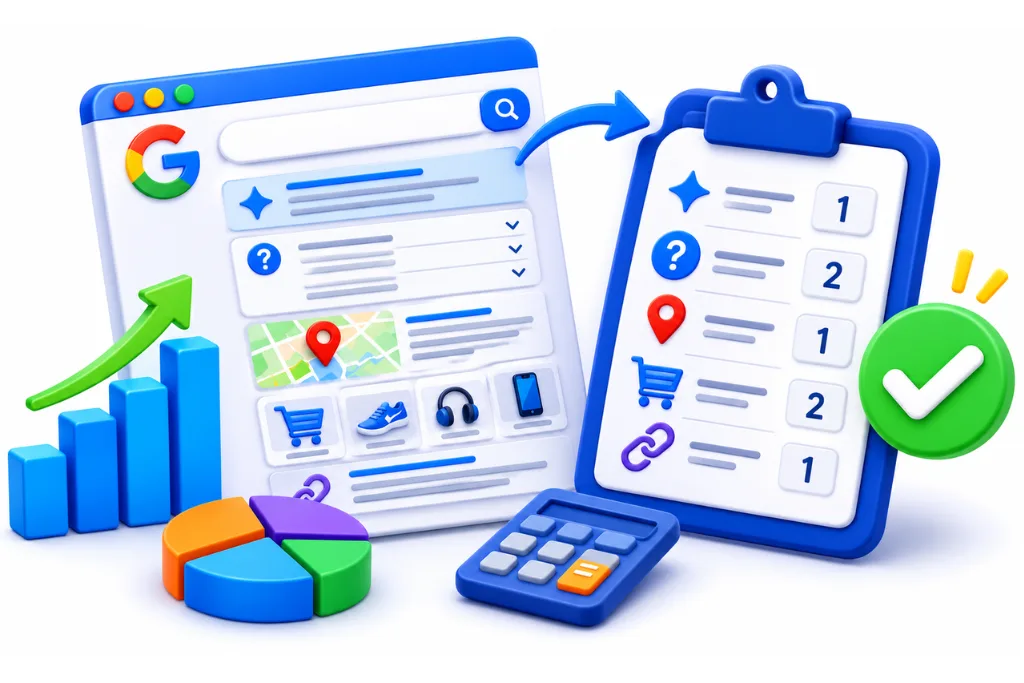
Use a quick tally. Open a sheet with one row per result and one column for page type. Pick from a short list so your counts stay consistent:
- Guide or blog post
- List or best-of article
- Comparison or review
- Product or category page
- Service or landing page
- Tool or calculator
- Homepage or brand page
- Video or forum thread
You can turn this into a simple scorecard you reuse for every keyword. Add columns for the date, the query, the region, the device and the features from minute 2. After a few weeks, you have a record of how each SERP looks over time.
The tally rule
- 6 or more of 10 in one type: dominant intent, build that page type.
- Two types with 3 to 5 each: mixed intent, decide which one fits your business.
- No type above 3: fractured intent, see the section on mixed intent below.
If Google shows fewer than 10 organic results, apply the same rule as a share: 60% or more in one type is dominant. For example, 5 of 8 counts.
How do you find the angle?
The angle is how the top pages approach the topic. Read the titles for audience, depth, format and freshness. Your page needs the same intent and format, with a better or sharper angle.
Read only the titles and the dates. Look for four things:
- Audience: beginners, business owners, developers, a local market?
- Depth: quick answer, step-by-step guide, or full reference?
- Format: list, how-to, worked example, template, tool?
- Freshness: are most pages from this year, or several years old?
Fresh dates across the top results suggest Google rewards recent pages for this query. Old dates suggest the topic is stable. Repeated words in titles, such as “worked example” or “free”, show what the top pages offer.
How do you decide which page to build?
Name the dominant interpretation, then the common and minor ones. Build the page type that matches the dominant interpretation. Cover common needs inside that page, and ignore minor ones.
Google’s rater guidelines explain this idea in section 12.5. In their words, “the dominant interpretation of a query is what most users mean”. The same section also defines common and minor interpretations, which fewer users mean (Google Search Quality Rater Guidelines).
Decision table
|
What dominates the SERP |
Intent |
Page to build |
|
Guides and how-to posts |
Know |
Blog guide |
|
Best-of lists, reviews, vs pages |
Commercial investigation |
Comparison or list post |
|
Product or category pages |
Do (buy) |
Category or product page |
|
Agency or provider pages |
Do (hire) |
Service page |
|
Tools and calculators |
Do (use) |
Free tool or template |
|
Local pack plus location pages |
Visit-in-Person |
Location page and Google Business Profile |
|
One brand’s homepage and sitelinks |
Website |
Do not target, unless it is your brand |
Once you know the page type, assign the keyword to one URL. Our guide to keyword mapping shows how. Giving two pages the same intent leads to keyword cannibalization.
Worked example: two queries scored side by side
Here are two real SERPs we scored on 16 November 2026, using a Google UAE profile. Our tool showed organic results, featured snippets and some People Also Ask questions. Results change often, so treat this as a snapshot.
Query 1: “serp intent analysis”
The top 8 organic results were six guides or articles and two tool pages. The articles came from Siteimprove, SerpLens (a worked-example guide), Contadu, LinkedIn, Semrush and samuelschmitt.com. The tools were from Ahrefs and GrowthGPT. We saw no featured snippet, and the People Also Ask question we saw was “How to do a SERP analysis?”.
- Tally: 6 guides, 2 tools.
- Dominant interpretation: learn how to read intent from a SERP (Know).
- Common interpretation: use a tool that does it for you (Do).
- Angle: one result is a worked example, and one dates from 2021.
- Page to build: a step-by-step guide with a worked example, which mentions tools briefly.
One more detail matters here. When we first looked at this query on 9 November, the list was different. Only Contadu and Siteimprove appeared both times. We used a different method each time, so we read this as a reminder that top results turn over, and a reason to re-check.
Query 2: “how to identify search intent”
All 8 organic results were guides or blog posts. They came from Semrush, Yoast, PureDesignHub, Ahrefs, areeshishtiaq.com, Artemis, LinkedIn Pulse and Squarespace. We saw no featured snippet. The People Also Ask question was “How to identify intent?”.
- Tally: 8 guides.
- Dominant interpretation: learn a method (Know).
- Common interpretation: none visible.
- Page to build: a clear how-to guide.
Both queries point to the same page type, so one guide can serve both. That is why this article targets them together. When two keywords show different dominant types, they need different pages. To go beyond intent and study competitors, links and content gaps, follow our full SERP analysis process.
What if the SERP cannot decide?
Sometimes no page type reaches 6 of 10. That means the query has several meanings or several needs. You can pick the meaning that suits your business, or build one page that serves the two biggest needs.
Google’s rater guidelines cover this in section 12.7.5, on queries with multiple user intents. A query like “content marketing” may show definitions, agency pages and courses on one page. In that case, check your business goal first.
- If you sell the service, a service page can still rank, but expect a harder climb.
- If you want awareness, write the guide and link to your service page from it.
- If the split is close, add a short section for the second need.
Mixed intent deserves its own playbook. Our post on mixed intent keywords explains how to handle it.
English vs Arabic: does the same need show a different SERP?
It can, so check both. UAE audiences may search in English, in Arabic or in a mix of the two. The same need in each language can return different page types, so score each SERP separately.
We did not score an Arabic SERP for this post, so treat this section as a method, not a finding. Do not assume one language mirrors the other. Run the same five-minute routine twice:
- Search the English query with gl=ae&hl=en.
- Search the closest Arabic query with gl=ae&hl=ar.
- Tally both SERPs on the same scorecard.
- Compare the dominant type, the features and the angle.
If both show the same dominant type, one page per language with the same structure may work. If they differ, plan the Arabic page around the Arabic SERP, not a straight translation. Also try how your buyers really type, including transliterated Arabic, if your audience uses it.
Section 12.3 of the rater guidelines covers locale and user location. Your buyers search in more than one language, so the same need deserves two separate scores.
When should you re-check search intent?
Re-check before you write, before you refresh a page, and whenever rankings or clicks drop without a clear cause. Intent changes over time, and new SERP features like AI Overviews and AI Mode change what users click.
The rater guidelines note that query meanings can change over time. Our post on search intent shift covers the signs in detail. Our own example above shows how quickly the top results can turn over.

AI Overviews and AI Mode as intent signals
An AI Overview at the top suggests Google sees a need for an explained answer. Google explains how these features work in AI features and your website. They also change how many people click through.
- Pew Research Center found that users who saw an AI summary clicked a traditional result in 8% of visits, against 15% without one (Pew Research Center).
- Ahrefs found, using December 2025 data on 300,000 keywords, that an AI Overview correlates with a 58% lower average CTR for the top-ranking page (Ahrefs).
So when an AI Overview appears, write a clear 40 to 60 word answer that it can quote. Then give readers a reason to click, such as a worked example, a table or a template. Our answer engine optimization services work on this kind of visibility.
A simple re-check schedule
- Before writing: always run the full five minutes.
- Every quarter: re-score your top pages’ main keywords.
- After a drop: compare the current SERP with your last scorecard.
- When new features appear: note them and adjust the page format.
For related guidance, read Google’s page on creating helpful, reliable, people-first content. If you want a team to run this check across your whole site, our SEO services and content marketing and SEO copywriting teams can help. For the bigger picture of how Google reads queries, see our pillar on how search engines understand search queries.
FAQ
Search the keyword in a clean, location-set browser and look at what Google shows. Count the page types in the top 10 results. If most are guides, the intent is informational, and if most are product or service pages, it is transactional. The keyword’s words give a hint, but the results page decides.
Run a short routine. Read the query, note the SERP features, tally the top results by page type, read the titles for the angle, then decide the dominant intent. It takes about five minutes per keyword once you have a scorecard set up.
A full SERP analysis looks at intent, competitors, content gaps, links and features. Intent is the first step, because it tells you which page type to build. After that, you compare the top pages in depth to find what you can do better.
The four common types are informational, navigational, commercial and transactional. Informational searchers want to learn, navigational searchers want a specific site, commercial searchers compare options, and transactional searchers want to act. Google’s rater guidelines use a different set of labels instead: Know, Do, Website and Visit-in-Person.
Search intent is the goal behind a search, what the person wants to find or do. In SEO, it decides which type of page can rank. A page that matches the intent has a real chance, while a page that misses it usually struggles however well it is written.
SERP features are the elements on a results page beyond the standard blue links. They include AI Overviews, featured snippets, People Also Ask, videos, local packs, shopping results and sitelinks. Each one is a clue about what searchers want.
Intent SEO means planning and writing pages around what searchers want, not only around the keyword. You check the results page first, then build the page type and format that Google already rewards. That way, you do not spend time on a page type the results page does not show.
Sources
- Google Search Quality Rater Guidelines
- Google, How Search Works: Ranking results
- Google Search Help: See results for a different country
- Google Programmable Search API reference: gl and hl parameters
- Google Search Central: Visual Elements Gallery
- Google Search Central: AI features and your website
- Google Search Central: Creating helpful, reliable, people-first content
- Pew Research Center: Google users are less likely to click on links when an AI summary appears
- Ahrefs: AI Overviews reduce clicks, updated study