
How Search Engines Understand Content: From Words to Entities and Meaning
How does Google understand content?
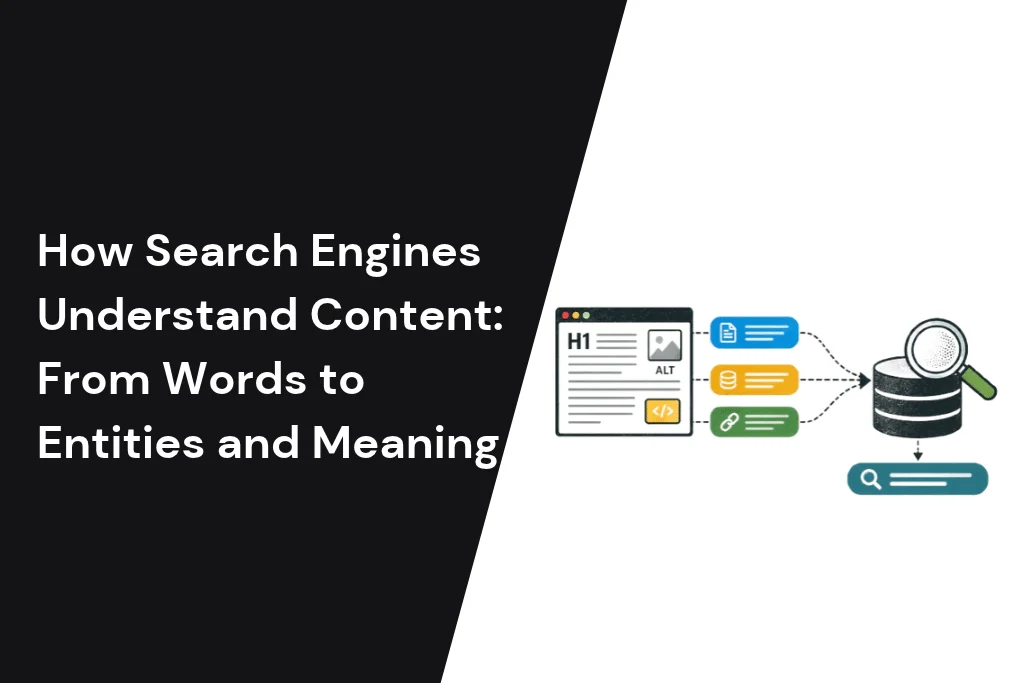
Google understands content by turning words into things. It renders your page, reads the language with AI systems such as BERT and neural matching, and picks out entities like brands, places and services. It links those entities to its Knowledge Graph. Headings, structured data, internal links and mentions elsewhere on the web add context.
This guide shows how each step works, using one example page throughout: a service page for a dental clinic in Jumeirah, Dubai. The clinic is an illustration, not a real business, but the page is typical of what we see from UAE companies. By the end you will know what Google does with your words. You will also know which SEO ideas to drop, and how to check whether Google reads your page the way you meant it.
Search engines understand content by analysing words, context, search intent, entities and semantic relationships rather than relying solely on exact keyword matches. They use language-processing technologies to interpret queries, identify people, businesses, products and locations, connect related concepts, and evaluate how well a webpage answers a user’s needs. For SEO, this means creating clear, accurate and well-structured content with descriptive headings, relevant internal links, consistent entity information and meaningful topic coverage. As AI-powered search continues to evolve, helping search systems understand the meaning and context of your content is increasingly important for discoverability. However, search engines and AI systems use different retrieval and ranking processes, so no optimisation technique guarantees rankings or citations in AI-generated answers.
From strings to things: why matching keywords stopped being enough
Early search engines matched the letters in a query to the letters on a page. Since 2012, Google has also tried to work out which real-world things a page is about. That shift, from strings of text to things, is the base of everything else in this guide.
A string is just a row of characters. The word “Jumeirah” is a string. On its own, it could mean a district of Dubai, a hotel group, a beach or a road. A system that only matches strings cannot tell which one you mean.
In May 2012 Google launched the Knowledge Graph to fix this. Google’s Amit Singhal described a system that understands real-world entities and their relationships: “things, not strings.” At launch it held more than 500 million objects and more than 3.5 billion facts (Google, 2012). By 2020 Google said it had over 500 billion facts about five billion entities (Google, 2020).
Language understanding moved the same way. In 2019 Google added BERT to Search and said it would help it better understand one in 10 searches in English in the US (Google, 2019). Its well-known example was “2019 brazil traveler to usa need a visa”. Older systems missed the meaning of “to” and showed results for US citizens travelling to Brazil.
This is what people mean by semantic search: search that works on meaning, not just matching words. Semantic SEO is the practice of writing and structuring pages so that meaning is easy to read: clear topics, clear entities and clear relationships between them.
Keywords still matter. People type words, and pages need to use the words people use. But a keyword is now a clue, not the whole answer. For the longer history, see our post on search engine evolution from traditional SEO to AI-powered discovery.
The content understanding pipeline in five steps
Google fetches and renders your page, breaks it into parts, finds the entities, works out what the page means, then stores it in its index. Google calls the stage where it “tries to understand what the page is about” indexing.
Google splits Search into crawling, indexing and serving. Its guide says that after a page is crawled, “Google tries to understand what the page is about” (Google Search Central). Inside that stage, it helps to think of five steps. This is our simplified model, not Google’s official naming.
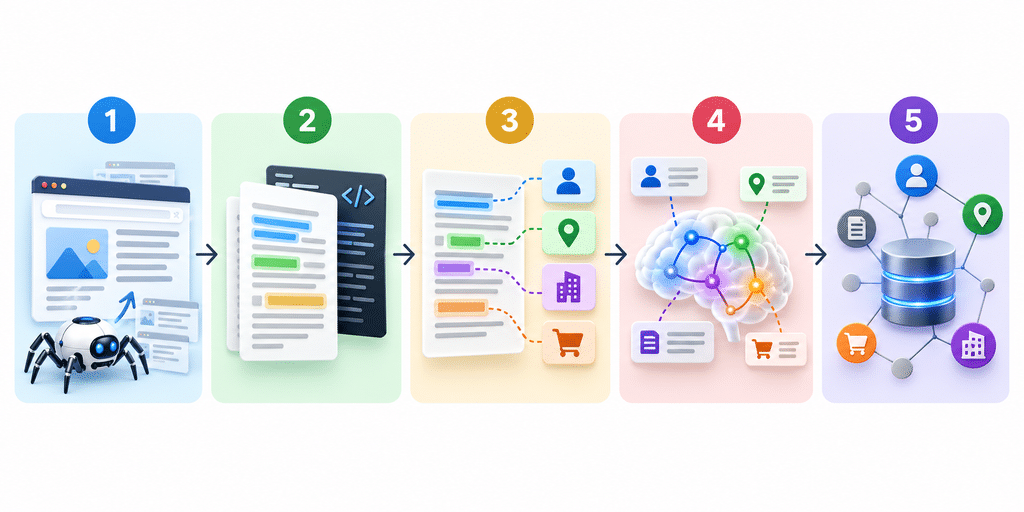
- Fetch and render. Googlebot downloads the page and runs its JavaScript in a recent version of Chrome. If the clinic’s treatment list only appears after a script runs, and that script fails, Google may never see the list.
- Parse. Google reads the text and key tags. Its guide names <title> elements, alt attributes, images and videos. On our page, that means the title, the H1 “Teeth Whitening in Jumeirah”, the treatment sections, prices, address and photo captions.
- Extract entities. The words become things. “Jumeirah” becomes a place, “teeth whitening” a treatment, and the clinic’s name an organisation. More on this below.
- Interpret meaning. Language models work out what the page is for. Is it selling a treatment, explaining one, or comparing clinics? That decides which searches it can match. Our guide to types of search intent covers the searcher’s side.
- Index and connect. Google stores what it learned and links the page to related entities and pages.
We keep crawling and indexing short here on purpose. Our posts on how search engines crawl, index and rank content and search engine databases and indexes cover those stages in full.
How Google reads language: RankBrain, neural matching, BERT and MUM
Google uses several AI systems to read language. RankBrain links words to concepts, neural matching links concepts in queries to concepts in pages, and BERT reads how word order changes meaning. MUM is real, but Google says it is not used for general ranking.
All of this falls under natural language processing (NLP): the branch of AI that helps computers read and interpret human language.
Many articles describe these systems as if each one replaced the last. Google does not. Its guide to Google Search ranking systems lists them as separate systems that work side by side.
| System | Introduced | What Google says it does | What it means for your writing |
|---|---|---|---|
| RankBrain | 2015 | Helps Google understand how words are related to concepts | You can rank for searches that do not use your exact words |
| Neural matching | 2018 | Understands representations of concepts in queries and pages | Cover the idea fully, not just the keyword |
| BERT | 2019 | Understands how combinations of words express different meanings and intent | Small words like “for”, “to” and “without” count. Write naturally |
| Passage ranking | 2020 | Identifies individual sections, or passages, of a page | Each section should make sense on its own |
| MUM | 2021 | Not used for general ranking. Used for some specific applications | Do not optimise “for MUM” |
Sources: descriptions from Google’s ranking systems guide. Dates from the Google posts linked in each row.
When Google introduced MUM, it called it 1,000 times more powerful than BERT and said it was trained across 75 languages. It can also understand information across text and images (Google, 2021). Yet the ranking systems guide says MUM is “not currently used for general ranking in Search”. Google names uses such as COVID-19 vaccine searches and featured snippet callouts.
Two older names need updating too. Hummingbird was a major change to Google’s ranking systems in August 2013 and is now listed as retired. The helpful content system is also retired as a separate system. Google says it became part of its core ranking systems in March 2024.
Under the hood, these models turn words into numbers called embeddings. Words with similar meanings sit close together. That is how a search for “tooth whitening near Jumeirah” can match a page that says “teeth whitening at our Jumeirah clinic”. Our post on how AI chunks and embeds web pages explains embeddings in more depth.
Entities, attributes and relationships: how a page becomes “things”
An entity is a distinct thing, such as a person, place, company or product. Google finds the entities on your page, works out which one matters most, and uses context to decide which meaning of a word you intend. Clear entities make a page easier to understand.
Every entity has attributes and relationships. Our clinic is an organisation. Its attributes include an address, opening hours and services. Its relationships include “located in Jumeirah” and “offers teeth whitening”. When those facts are stated clearly and consistently, Google has an easier job. Writing with this in mind is often called entity SEO.
Salience: which entity is the page really about?
Google offers a public tool that shows how this kind of analysis works: the Cloud Natural Language API. It finds entities in text and labels each with a type, such as PERSON, LOCATION, ORGANIZATION or CONSUMER_GOOD. It also gives a salience score from 0 to 1.0, which shows how central an entity is to the whole text. Where it can, it returns a Knowledge Graph ID and a Wikipedia link (Google Cloud docs).
Keep in mind that this is a Google Cloud product, not the system that ranks your pages. It is a window into how machines read text, not a ranking score.
When you run a page through it, look at the top entity. On a good whitening page, the treatment and the clinic should be near the top. If “Dubai” or a vague word like “smile” scores higher than the service, the page probably does not say clearly what it offers.
Disambiguation: one word, several meanings
Google uses the words around an entity to decide which meaning applies. If the page mentions a clinic, a street address and dental treatments, “Jumeirah” is almost certainly the district. If it mentions suites, check-in and a resort, it is more likely the hotel group.
You can help by naming things fully at least once. Write “Jumeirah Beach Residence (JBR), Dubai” before you shorten it to “JBR”. Use your full business name the same way across your site, your Google Business Profile and your social profiles.
Passages, headings and page structure
Google can judge how relevant one section of a page is to a search, not just the page as a whole. Clear headings and sections that answer one question each make that easier.
In October 2020 Google said it could now “better understand the relevancy of specific passages”. It said this would improve 7 percent of search queries across all languages (Google, 2020). Google describes this as a ranking change. Its ranking systems guide calls it passage ranking, an AI system that identifies sections of a page. You will still see it called “passage indexing” in some SEO posts.
Suppose the clinic page has a section headed “Is teeth whitening safe for sensitive teeth?” and answers it in the first two sentences. That section can help the page appear for a search about sensitivity, even though the page as a whole is about whitening.
A few structural habits help:
- Use one H1 that names the main topic.
- Give each H2 one job, and phrase it the way people ask.
- Put the direct answer in the first sentence or two under each heading.
- Use lists and tables for steps, prices and comparisons.
- Write alt text that describes the image, such as “dentist applying whitening gel in a Jumeirah clinic”.
The same habits help AI tools that quote short passages. Our post on how Google AI Overviews work covers that side.
Structured data: what schema helps Google understand, and what it does not do
Structured data is code that labels the facts on your page, such as your business name, address and services. Google says it uses structured data “to understand the content of the page”. It can make a page eligible for rich results, but it does not guarantee them.
Google’s introduction to structured data states that it uses the structured data it finds “to understand the content of the page”. It recommends the JSON-LD format where your site allows it. It also warns that markup which breaks its guidelines may be ineligible for rich results.
For our clinic, useful types would be a LocalBusiness subtype such as Dentist, plus BreadcrumbList. A sameAs property can point to the clinic’s official profiles elsewhere, which helps tie them to the same entity.
What structured data does not do:
- It does not guarantee rich results. Google decides whether to show them.
- It is not needed for AI features. Google says no special schema.org markup is needed to appear in AI Overviews or AI Mode (Google Search Central).
- It cannot contradict the page. Google says your structured data should match the visible text. If your markup says you open at 8am and your page says 9am, you have given Google two answers.
Context beyond the page: internal links, topic clusters and mentions
Google does not read a page in isolation. Internal links tell it how your pages relate. A set of pages covering one topic in depth shows what your site is about. Mentions of your business on other sites help confirm who you are.
Internal links work like signposts. When the whitening page links to the clinic’s “Dental veneers” and “Book a consultation” pages with clear anchor text, Google learns how they connect. A page that nothing links to looks less important than one the site refers to often.
Topic clusters show depth. A single whitening page says the clinic offers whitening. A group of pages on whitening options, aftercare, costs and sensitivity says the clinic knows the subject. SEOs call this topical authority. Google does not publish a “topical authority” score, so treat it as a planning idea, not a metric. Cover a topic in depth, link the pages together, and give each page its own job so they do not compete.
Mentions on other sites matter because the Knowledge Graph draws on information shared across the web, plus open source and licensed databases (Google, 2020). Consistent name, address and phone details across directories, your Google Business Profile and press coverage all point to the same entity.
Meaning meets quality: helpful content and E-E-A-T
Understanding what a page is about is only half the job. Google also judges whether the page is helpful and trustworthy. Its guidance asks three questions about any content: who made it, how it was made, and why it exists.
Google’s guide to creating helpful, reliable, people-first content sets out those questions:
- Who created the content? Readers should be able to tell, ideally through a byline that leads to the author’s background.
- How was it created? Google says this can include automated, AI-generated and AI-assisted content.
- Why was it created? Google says you should be “creating content primarily to help people”.
On AI-generated text, Google’s focus is effort, not the tool. Its guide says using generative AI to produce large amounts of text without manual oversight or curation “represents little to no effort”. For the clinic, a page written or checked by the dentist beats a generic one. Real prices and real aftercare advice are things a generic page cannot copy.
Google’s quality raters judge pages on experience, expertise, authoritativeness and trust, often shortened to E-E-A-T. We cover these in our guide to search quality evaluation.
If your pages read well to people but still confuse search engines, our website content writing team writes service pages around clear entities and real customer questions.
Arabic, English and Arabizi: how Google understands bilingual UAE sites
Google works out a page’s language from its visible text, not from code like the lang attribute. It recommends a separate URL for each language version, linked with hreflang. Mixing English and Arabic on one page makes the language harder to read.
Most UAE businesses need both English and Arabic. Google’s guide to multilingual sites is clear:
- “Google uses the visible content of your page to determine its language.” It does not use code such as lang attributes, or the URL.
- Keep each page’s content and navigation in one language, and avoid side-by-side translations.
- Use different URLs for each language version, not cookies or browser settings.
- Use hreflang annotations so Google can send searchers to the right version.
So the clinic should have /en/teeth-whitening/ and /ar/teeth-whitening/, each fully in one language and linked to each other with hreflang. A page with an English body and an Arabic sidebar sends mixed signals.
Arabic brings its own challenges. Many people in the Gulf search in dialect. Many also type Arabic words in Latin letters and numbers, known as Arabizi, such as “ta3al” for “come”. Google does not publish how it handles each dialect or Arabizi, so we will not guess. The practical step is to look at the Search Console queries for your Arabic pages and use the words your customers actually type.
Google’s public Natural Language API also has a limit here. It supports Arabic for sentiment analysis and text moderation, but not for entity analysis (Google Cloud docs). So you cannot run the entity check above on Arabic text with that tool. This says nothing about Google Search itself, which serves Arabic results every day. It just means your Arabic pages need a manual review.
Good Arabic pages are written for Arabic readers, not translated line by line. Our content localisation service handles English and Arabic versions together.
How AI Overviews and AI Mode use the same understanding
Google’s AI features draw on the same index and the same understanding of pages. To be eligible, a page must be indexed and able to show in Search with a snippet. Google says there are no extra requirements for AI Overviews or AI Mode.
Google’s page on AI features and your website says there are “no additional requirements to appear in AI Overviews or AI Mode”. It adds that both may use a technique called query fan-out, which runs several related searches to build one answer. Our post on query fan-out in Google AI Mode explains how that works.
You can see this on the results page. At the time of writing (16 October 2026), a search for “how google understands content” from the UAE showed an AI Overview at the top. Its sources included Google for Developers, Yoast and DWAO. These results change often, so treat them as a snapshot.
A page that Google understands well in normal Search is also easier for its AI features to use. Clear entities, direct answers and consistent facts help both.
How to check what Google thinks your page is about
You can check Google’s view of a page in about 10 minutes. Look at the queries the page appears for in Search Console, then view the rendered page with the URL Inspection tool. Finally, test your structured data with the Rich Results Test.
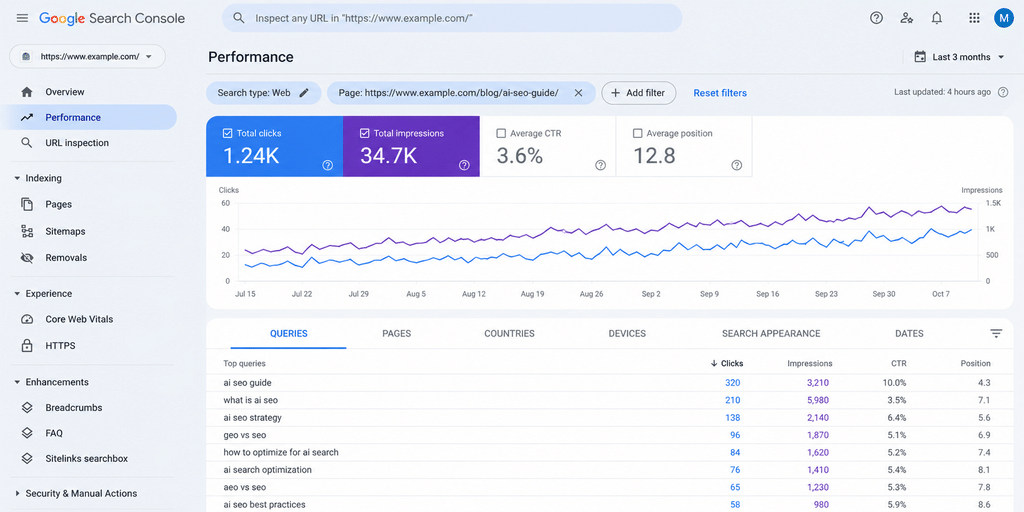
- Read the page’s queries. In Search Console, open the Performance report, filter by page, and look at the Queries tab. These are the searches Google already shows the page for. If the whitening page shows up for “dental clinic jobs Dubai”, something on the page points the wrong way.
- See what Google renders. Use the URL Inspection tool. Run a live test and click “View tested page” to see a screenshot and the HTML. Check that your main text, prices and FAQs are there.
- Test your structured data. Paste the URL into the Rich Results Test. Fix errors, then check that every value matches the visible page.
- Check the entities. Paste your English copy into the Natural Language API demo. Is your main service the top entity? Is your business recognised as an organisation?
- Look yourself up. Search your exact business name. Does a knowledge panel appear? Are your details consistent? Developers can also query the Knowledge Graph Search API, though Google says it is not suitable as a production-critical service.
Three myths that won’t die
Google has not said it uses LSI keywords. Passage ranking is a ranking system, not a separate index. And longer content does not win by default.
- “Add LSI keywords.” Latent semantic indexing is an older information retrieval method. Google has not said it uses it in Search, and “LSI keywords” is an SEO label, not a Google term. Cover the topic well and related words appear naturally.
- “Google indexes passages separately.” Google announced passage ranking as a ranking improvement and lists it among its ranking systems. Treat it as a reason to write clear sections, not as a separate index to target.
- “Longer is always better.” Length is not a quality signal on its own. The best answer to the question wins. Sometimes that takes 300 words, sometimes 3,000.
Conclusion:
Search engines have evolved far beyond matching keywords to webpages. They analyse language, interpret search intent, examine relationships between entities, evaluate context and use multiple signals to identify content that best satisfies a user’s needs. From understanding individual words to recognising entities and connecting related concepts, modern search systems build a deeper understanding of what a webpage communicates.
For businesses and SEO professionals, this shift makes meaningful content more important than keyword repetition. Creating clear, accurate and well-structured pages, establishing consistent entity information, demonstrating expertise and connecting related topics through a logical site architecture can help search engines interpret a website more effectively.
These principles also matter as AI-powered search experiences become more prominent. Although traditional search engines and generative AI systems do not all process or retrieve information in the same way, they benefit from content that is accessible, relevant, trustworthy and easy to interpret.
Ultimately, successful SEO is not just about helping search engines find your words; it is about helping them understand the meaning behind them. When your content clearly communicates what you know, whom you serve and how your information connects to a wider topic, you build a stronger foundation for organic visibility and discovery across an evolving search landscape.
Frequently asked questions
How does Google understand content?
Google renders the page, reads the text with AI language systems such as BERT and neural matching, and identifies entities like brands, places and services. It links those entities to its Knowledge Graph. Headings, structured data, internal links and mentions on other sites add context.
What is the difference between semantic search and keyword search?
Keyword search matches the words in a query to the words on a page. Semantic search tries to match meaning. For example, a semantic search for “clinic that brightens teeth in Jumeirah” can find a page about “teeth whitening in Jumeirah” even though the words differ.
How does Google decide which results to show you?
Google works out what the search means, then looks for pages in its index that match. Its ranking systems weigh many factors, including relevance and quality, to order the results. Our post on informational, navigational and transactional queries explains the intent side.
How does Google get its knowledge?
Google builds its index by crawling the public web. Its Knowledge Graph also draws on information shared across the web and on open source and licensed databases. Wikipedia is a common source, but Google says it is not the only one.
Is Google right 100% of the time? How accurate is Google Search?
No search engine is right every time. Google can misread a page, mix up two entities with similar names, or show out-of-date facts. Its AI Overviews carry a note that AI responses may include mistakes. Clear, consistent information on your own pages lowers the chance that Google gets your business wrong.
How long does it take Google to understand a new page?
Google first has to crawl the page. Google says crawling “can take anywhere from a few days to a few weeks”, and that asking for a recrawl does not guarantee the page will be included (Google Search Central). Check the page with the URL Inspection tool and watch its queries in Search Console.
Does schema markup improve rankings?
Not directly. Google uses structured data to understand a page and to decide whether it is eligible for rich results. It does not guarantee those results or lift a weak page on its own.
Does Google understand Arabic content?
Yes. Google Search serves Arabic results and works out a page’s language from its visible text. Keep each language on its own URL and link the versions with hreflang. Google’s public Natural Language API does not offer entity analysis for Arabic, so check Arabic pages by hand.
Does Google treat AI-generated content differently?
Google judges content on how helpful it is, not on the tool used. But it says mass-producing text with generative AI without manual oversight shows little to no effort. Have a real expert write or review it.
Can ChatGPT do SEO? Does it use semantic search?
ChatGPT can help with research, outlines and drafts. It works with meaning rather than exact word matches, which is the idea behind semantic search. But it cannot see your Search Console data or add first-hand experience on its own. Our guide to how large language models work explains why.