
Robots.txt vs Noindex: Which to Use When, and the Mistake That Deindexes Sites
Robots.txt controls crawling: it tells search engine bots which URLs they may fetch. Noindex controls indexing: it tells Google not to show a page in results. To keep a page out of Google, let it be crawled and add noindex. Use robots.txt only to stop bots fetching pages that never need to rank.
Robots.txt vs noindex: the short answer
Robots.txt is a crawl control and noindex is an index control. If a page must stay out of Google, it has to stay crawlable so Google can read the noindex rule. Never use both on the same URL, because a disallow hides the noindex tag from the crawler.
That single rule answers most “noindex vs disallow” questions. The rest of this guide shows what each control can and cannot do. It also maps every combination and shows how to fix a site that dropped out of search after a launch. If you want the bigger picture first, our guide to how search engines crawl, index and rank content explains where each step fits.
|
Feature |
Robots.txt (Disallow) |
Noindex (meta tag or X-Robots-Tag) |
|
What it controls |
Crawling: whether a bot may fetch the URL |
Indexing: whether the page may appear in results |
|
Where it lives |
One file at the root of the host, such as /robots.txt |
In the page head, or in the HTTP response header |
|
Can Google fetch the page? |
No, if the path is disallowed |
Yes, and it must, to read the rule |
|
Can the URL still appear in Google? |
Yes, from links, usually without a description |
No, once Google recrawls and processes the tag |
|
Best for |
Saving crawl effort on low-value URLs |
Keeping specific pages out of search results |
|
Verdict |
Not a removal tool |
The right tool for keeping pages out |
What robots.txt controls, and what it cannot do
Robots.txt manages crawler traffic. Google says the file is “not a mechanism for keeping a web page out of Google”, and a disallowed URL that other sites link to can still appear in results, usually without a description (Google, Introduction to robots.txt).
What it is good for
Use robots.txt when the problem is crawling, not visibility. Typical cases are endless filter combinations, internal search result pages and other URL patterns that waste bot visits. On large sites this protects your crawl budget, so Googlebot spends its time on pages that matter.
The syntax is short. A group starts with User-agent, followed by Disallow and Allow lines with path patterns. For example, “User-agent: *” on one line and “Disallow: /search/” on the next asks all bots to skip your internal search pages. Rules apply per user-agent, so you can treat Googlebot and other crawlers differently.
What it cannot do
Robots.txt is not security. The Robots Exclusion Protocol standard states that “these rules are not a form of access authorization” (RFC 9309). Anyone can read your robots.txt file, and badly behaved bots can ignore it. Private files need a login or password, not a disallow line.
How Google handles the file itself
The file has failure modes that most guides skip. According to Google’s robots.txt specification:
- A 4xx response (except 429) is treated as if no robots.txt exists, so Google crawls without restrictions.
- A 5xx server error makes Google stop crawling the whole site for 12 hours. After that it uses the last good copy of the file for up to 30 days.
- Google caches robots.txt for up to 24 hours, so a fix is not seen instantly.
- Google reads up to 500 KiB of the file and ignores anything after that.
A broken robots.txt can pause crawling of a whole site, even if every page is fine. If Googlebot seems to have stopped visiting, our guide on why Google is not crawling your site walks through the checks.
Blocking CSS, JavaScript and API paths
Disallowing resource folders can break how Google sees your pages. Google states that it “won’t render JavaScript from blocked files or on blocked pages” (Google, JavaScript SEO basics). If your theme files or API endpoints sit behind a disallow, Google may index a half-empty page. Our article on how Google renders JavaScript pages covers this in more detail.
What noindex controls: meta robots tag vs X-Robots-Tag
Noindex tells Google not to show a page in search results. It works in two ways: as a meta robots tag in the HTML, or as an X-Robots-Tag in the HTTP response header. Either way, the URL must not be blocked by robots.txt, or “the crawler will never see the noindex rule” (Google, Block Search indexing with noindex).
The meta robots tag
For normal HTML pages, add a meta tag to the head of the page. Written out, it is: meta name=”robots” content=”noindex”. This targets all search engines. To target only Google, use name=”googlebot” instead.
You can combine values. Common values are shown below.
|
Directive |
What it means |
|
noindex |
Do not show this page in results |
|
noindex, follow |
Do not show this page; the follow value is the default, so it adds nothing extra |
|
noindex, nofollow |
Do not show this page and do not follow its links |
|
none |
Same as noindex, nofollow |
|
nofollow |
Do not follow links on this page (the page can still be indexed) |
The X-Robots-Tag header
PDFs, images and other files have no HTML head, so the rule goes in the HTTP response instead. The server sends a header line such as “X-Robots-Tag: noindex”. Google’s robots meta tag and X-Robots-Tag specification includes an Apache example that applies “noindex, nofollow” to every PDF file on a site.
The same specification makes one point that matters for this whole debate: robots directives are only discovered when a URL is crawled. A tag Google never fetches does nothing.
The four combinations and what Google does with each
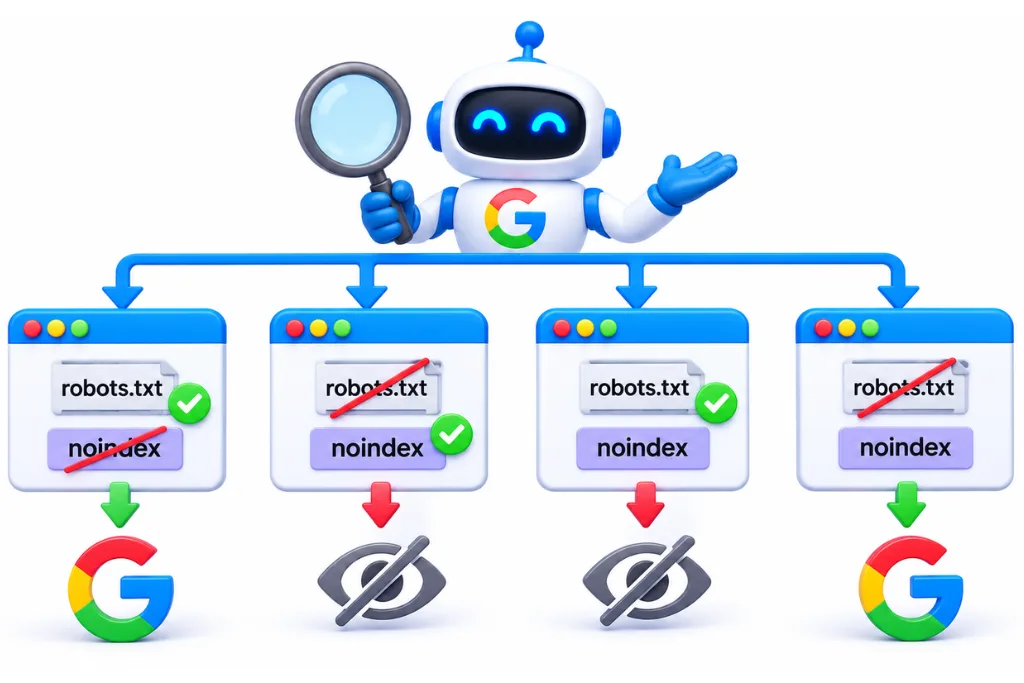
There are only four ways to mix these two controls, and only one of them causes real trouble. The risky one is a disallow plus a noindex tag, because Google cannot crawl the page to see the tag, so the URL can stay indexed.
|
Crawling |
Noindex |
What Google does |
Use it for |
|
Allowed |
No tag |
Crawls and may index the page |
Pages you want to rank |
|
Allowed |
Noindex |
Crawls, reads the tag and keeps the page out of results once processed |
Pages users can visit but should not find in Google |
|
Disallowed |
No tag |
Skips the page, but the URL can still be indexed from links, usually without a description |
Low-value URLs that nobody links to |
|
Disallowed |
Noindex |
Cannot see the tag, so the URL can stay stuck in the index |
Nothing: avoid this mix |
Rows three and four both explain the Search Console status “Indexed, though blocked by robots.txt”. It appears whenever a blocked URL gets indexed from links, and adding noindex to that URL will not clear it while the block stays. Google’s Page indexing report help explains that “robots.txt is not the correct mechanism to avoid being indexed”. The fix is to remove the block and use noindex instead.
The mistake that deindexes sites: four launch errors and how to recover
A common way for a whole site to fall out of Google is a launch that carries test settings into production. A staging noindex, a “Disallow: /” line, a CMS checkbox or a JavaScript noindex trick can each remove pages at scale.
1. A staging noindex left on
Developers often add a site-wide noindex to staging so test pages stay out of Google. If the template or server header goes live unchanged, every page tells Google to drop it. Pages then show up as “Excluded by noindex tag” in Search Console.
2. “Disallow: /” pushed live
A staging robots.txt usually contains “User-agent: *” and “Disallow: /”, which blocks the entire host. Copied to the live site, it stops Google crawling every page. URLs that stay in the index can then show without a description, as Google can no longer read them.
3. WordPress “Discourage search engines”
WordPress has a checkbox under Settings, Reading called “Discourage search engines from indexing this site”. Since version 5.3 it adds a noindex, nofollow meta robots tag to every page (WordPress, Settings Reading screen). It is often ticked during a build and forgotten at launch. If your site runs on WordPress, our WordPress SEO services cover launch checks like this one.
4. A JavaScript noindex trap
Some sites ship noindex in the original HTML and use JavaScript to remove it once the page loads. Google warns that when it finds noindex, “it may skip rendering and JavaScript execution”, so this approach “may not work as expected” (Google, JavaScript SEO basics). Search Engine Roundtable reported the documentation change in December 2025. If you want a page indexed, keep noindex out of the original code.
How to recover
Act in this order, and keep a log of what you changed and when.
- Remove the cause: delete the site-wide noindex, replace the robots.txt file, untick the WordPress setting or fix the original HTML.
- Check the live robots.txt URL in a browser. Google can cache the file for up to 24 hours, so give it a day before you expect the change to show in Search Console.
- Run the URL Inspection live test on your homepage and your most important pages. Confirm that crawling and indexing are both allowed.
- Request indexing for those key pages and resubmit your sitemap.
- Watch the Page indexing report and Search Console performance data over the following weeks.
Google does not publish a fixed recovery time. Each page comes back only after Google recrawls it, so key pages you inspect and resubmit are the ones to watch first. If traffic has not recovered after a launch, a technical SEO audit can trace which directive is still in the way.
Which one to use: a decision table for 12 page types
Choose noindex when a page must stay out of results, and robots.txt when you only want to save crawl effort on pages that are not indexed. Use canonical tags for duplicates, and a login for anything private.
|
Page type |
Best control |
Why |
|
Thank-you pages |
Noindex |
Users need the page, search does not |
|
Internal search results |
Noindex first, robots.txt later once the pages have left the index |
Thin pages that can create endless URLs |
|
Cart and checkout |
Noindex or robots.txt |
No search value; block crawling if they waste visits |
|
Login pages |
Noindex |
Keep crawlable so the tag is seen |
|
Staging site |
Password protection |
Robots.txt is public and is not access control |
|
Tag and archive pages |
Noindex if thin, otherwise improve them |
Keeps weak pages out of results while users can still browse them |
|
Filter and parameter URLs |
Canonical, plus robots.txt for crawl waste |
Consolidates duplicates and saves crawl effort |
|
PDFs and brochures |
X-Robots-Tag noindex |
Files have no HTML head |
|
Old service pages |
301 redirect, or 404 or 410 |
Removes or replaces the URL cleanly |
|
Duplicate product pages |
Canonical tag |
Google advises against noindex for canonicalization |
|
Paid campaign landing pages |
Noindex |
Avoids competing with your organic pages |
|
Admin areas |
Robots.txt plus a login |
Saves crawl effort; the login does the protecting |
Two of these rows need a note. For duplicates, Google says it does not recommend noindex to choose a canonical, because “it will completely block the page from Search”, and it also says not to use robots.txt for canonicalization (Google, consolidate duplicate URLs). For internal search and filters, add noindex first and only add a disallow later, once Google has dropped the pages, never at the same time.
How to remove a page from Google safely: the order of operations
To deindex a page, keep it crawlable, add noindex or return a 404 or 410, and wait for Google to recrawl it. Only block crawling afterwards, and only if crawl waste matters. Blocking first is a frequent reason a page stays stuck in results.
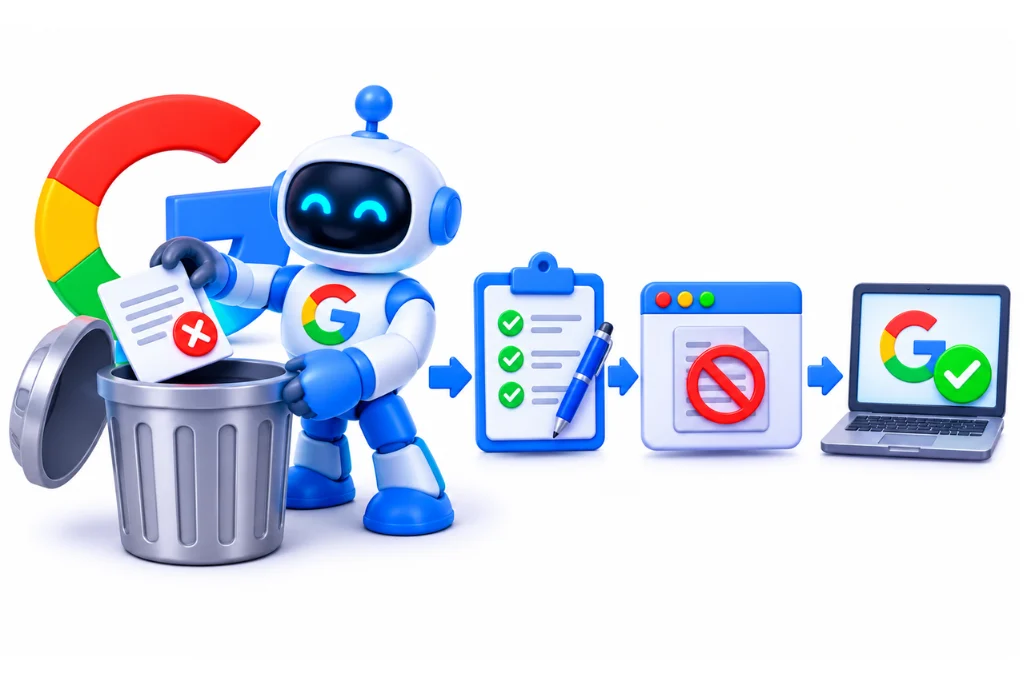
- Allow crawling. Remove any robots.txt rule that blocks the URL.
- Add noindex, or remove the page. Use the meta tag or X-Robots-Tag if the page should stay live. Return 404 or 410 if it should go, or a 301 if a better page replaces it.
- Verify. Use the URL Inspection tool to confirm Google sees the noindex or the error code.
- Use the Removals tool only when it is urgent. A temporary removal “lasts only about six months”, and permanent removal still needs a 404, 410, password or noindex (Search Console Help, Removals tool).
- Block crawling later, if needed. Once the page has left the index, a disallow can save crawl effort on large sites.
Martin Splitt of Google gave the same advice: pick the control that matches the goal, and do not combine them on one URL (Search Engine Journal).
Myths that still circulate
Four myths sit behind many robots.txt and noindex mistakes. The biggest is that you can put noindex in robots.txt. Google retired that rule in 2019.
- “Noindex: in robots.txt works.” Google stopped supporting it on 1 September 2019. Its alternatives are a noindex tag or header, 404 or 410, password protection, Disallow for crawling, and the Search Console removal tool (Google, A note on unsupported rules in robots.txt). Forum answers still recommend it, so check any advice you copy.
- “Robots.txt keeps pages private.” It is a public file and not access control. Use a login.
- “A canonical tag removes a page.” Google describes rel=”canonical” as a strong signal for choosing between duplicates. It does not remove a URL from Google.
- “Nofollow stops indexing.” Nofollow is about links. A page with only nofollow can still be indexed.
How to check which directive Google actually sees
Do not trust the CMS settings screen. Check the live response, the original HTML and Google’s own tools. Each one can show a different answer.
|
Check |
What it tells you |
|
Header check (curl -I plus the URL, or the Network tab in browser dev tools) |
Whether an X-Robots-Tag header is sent, and the status code |
|
View source (original HTML) |
Whether noindex is in the code Google downloads first |
|
URL Inspection live test |
Whether Google can crawl the URL and whether indexing is allowed |
|
Search Console robots.txt report |
Which robots.txt files Google fetched and any errors |
|
Page indexing report |
Statuses such as “Excluded by noindex tag” and “Indexed, though blocked by robots.txt” |
|
A site crawler |
Every URL with noindex, disallow or both, across the whole site |
The robots.txt report replaced the old robots.txt Tester in November 2023 (Search Engine Roundtable). If a page is crawled but still missing, read our guides on what indexed actually means and on the crawled, currently not indexed status. Those cases are about quality or duplication, not directives.
Robots.txt and noindex on UAE sites
Sites in Dubai and the GCC raise a few patterns of their own. Most come from bilingual setups, client approval workflows and ecommerce filters.
- Bilingual /en/ and /ar/ paths. A disallow written for one language folder can catch the other by mistake. Arabic paths are often percent-encoded, so test the exact encoded path, not the Arabic text you typed.
- Staging subdomains for client approval. Agencies often share a staging link with the client before launch. Protect it with a password instead of relying on robots.txt, and remove the staging noindex before go-live.
- Shopify and Magento filters. Currency, size and colour parameters can create thousands of URLs. Use canonicals to consolidate them and robots.txt to cut crawl waste, rather than noindex on every variant.
- PDF brochures. Price lists and company profiles are often uploaded as PDFs. If they should not rank, send an X-Robots-Tag noindex header for them.
Our technical SEO services cover these checks for bilingual and ecommerce sites.
AI crawlers: a quick note
Robots.txt rules are set per user-agent, so you can allow Googlebot and block other bots, including AI crawlers, by name. Noindex is a search engine rule about results, not a general opt-out from every bot. Treat AI crawler access as a separate robots.txt decision.
FAQ
Robots.txt controls crawling, meaning which URLs a bot may fetch. Noindex controls indexing, meaning whether a page can appear in search results. A page blocked in robots.txt can still be indexed from links, while a crawlable page with noindex stays out of results.
No. Robots.txt stops Google fetching a page, but the URL can still be indexed if other pages link to it, usually without a description. To prevent indexing, allow crawling and use a noindex tag or header.
Use noindex for pages people can visit but that should not appear in Google, such as thank-you pages, internal search results, login pages and paid campaign landing pages. The page must stay crawlable so Google can read the tag.
Yes. Google has to crawl a page to see its noindex rule. If you block the page in robots.txt, Google cannot see the tag and the URL may stay in the index.
Noindex tells Google not to show the page in results. Nofollow tells Google not to follow the links on the page. A page with only nofollow can still be indexed.
View the page source and search for a meta robots tag with noindex, then check the HTTP headers for an X-Robots-Tag. The URL Inspection tool in Search Console shows whether Google sees indexing as allowed.
No. Google stopped supporting noindex in robots.txt on 1 September 2019. Use a meta robots tag or an X-Robots-Tag header instead, and keep the page crawlable.
Noindex is a directive that asks search engines not to include a page in their results. It is set with a meta robots tag in the HTML or an X-Robots-Tag in the HTTP header.
Sources
- Google Search Central: Block Search indexing with noindex
- Google Search Central: Introduction to robots.txt
- Google: How Google interprets the robots.txt specification
- Google Search Central: Robots meta tag, data-nosnippet and X-Robots-Tag specifications
- Google Search Central: JavaScript SEO basics
- Google Search Central: Consolidate duplicate URLs
- Google Webmaster Central Blog: A note on unsupported rules in robots.txt
- Search Console Help: Page indexing report
- Search Console Help: Removals tool
- IETF RFC 9309: Robots Exclusion Protocol
- WordPress Documentation: Settings Reading screen
- Search Engine Roundtable: Google warns about noindex tags and JavaScript
- Search Engine Roundtable: Search Console robots.txt report replaces the Tester
- Search Engine Journal: Google on when to use noindex vs disallow