Discovered vs Crawled, Currently Not Indexed: Which One Is the Bigger Problem?
Discovered – currently not indexed means Google knows the URL but has not crawled it yet, usually because it rescheduled the crawl to avoid overloading the site. Crawled – currently not indexed means Google fetched the page and chose not to index it. Neither is a penalty. The bigger problem is whichever keeps growing on pages that matter.
Discovered vs Crawled, currently not indexed: the short answer
Fix whichever status is growing on pages that matter, and if both are, start with Discovered. It sits earlier in the process, so it can hold back every new page you publish.
Discovered is a scheduling problem: Google has not looked yet. Crawled is a value judgement: Google looked and passed. A few URLs in either status are normal, so a small count needs no action.
What each status means, according to Google
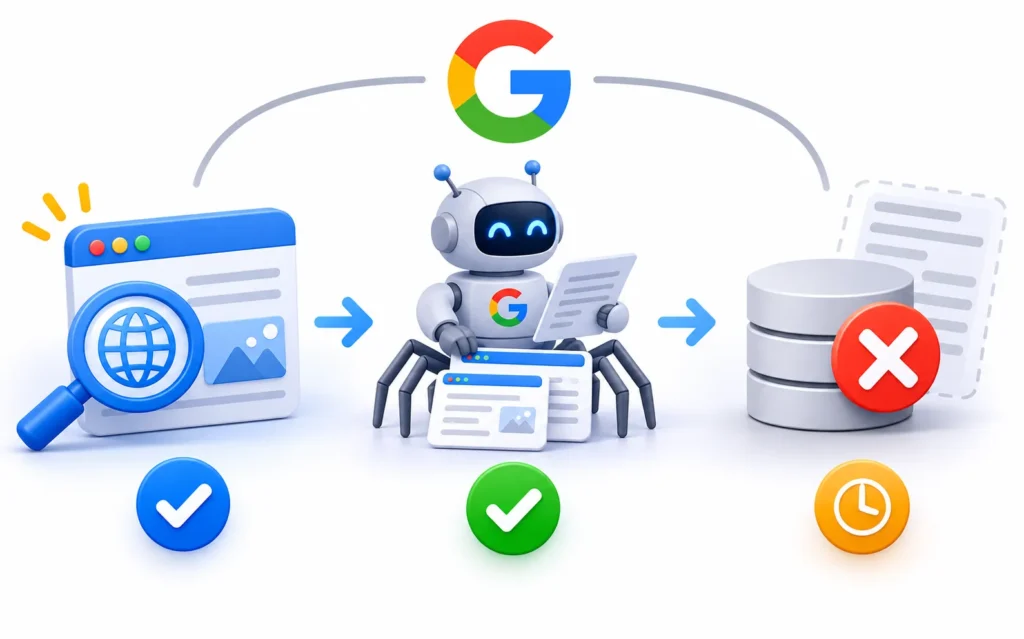
Both statuses appear in the Page indexing report, and the last crawl date tells them apart. It is empty for Discovered and filled for Crawled. Think of them as two stages of one funnel: Discovered, then Crawled, then Indexed.
Discovered – currently not indexed
Google’s Page indexing report help page says the page was found but not crawled yet. It adds that, typically, “this was expected to overload the site; therefore Google rescheduled the crawl”. So Google points at capacity first.
To see how the queue gets decided, read how Googlebot decides what to crawl. Our guide to how search engines crawl, index and rank content shows where this stage sits in the full lifecycle.
Crawled – currently not indexed
Google rewrote this text on 3 November 2026, as Search Engine Roundtable reported. The old version said the page might or might not be indexed later, and that resubmitting was unnecessary. The new version says Google doesn’t index every page on the web, so this is a common message that doesn’t always need attention.
Google’s guide to how Search works makes the same point more widely: indexing is not guaranteed for any page. The Discovered text did not change.
Discovered vs Crawled side by side
The main difference is whether Googlebot has fetched the page. Most other differences follow from that.
|
Question |
Discovered |
Crawled |
|
Has Googlebot fetched it? |
No |
Yes |
|
Last crawl date |
Empty |
Filled |
|
Usual cause |
Server capacity, crawl waste, weak links or low demand |
Thin, duplicate or low-value content |
|
Who usually fixes it |
Developer, host and SEO lead |
Content owner and SEO lead |
|
First check |
Crawl Stats report and Hostload exceeded |
URL Inspection, then the page itself |
|
Does Request indexing help? |
For a few key URLs, after fixes |
Only after the page has changed |
|
Where to go next |
The fix order below |
Which one is the bigger problem? A verdict by site type
The bigger problem depends on your site’s size and on what sits in each list. The verdicts below are our judgement, since Google does not rank the two statuses. The 5-minute test beneath them has the last word.
|
Site type |
Usually the bigger problem |
Why, and what to check first |
|
New site |
Discovered |
Google has little reason to prioritise an unknown site, so strengthen links and publish fewer, stronger pages |
|
Small service site |
Crawled |
Server capacity is rarely the limit at this size, so check whether each page earns its place |
|
Large store |
Discovered |
Filters and sort options can use up crawling, so reduce crawl waste first |
|
Bilingual site |
Discovered at launch, Crawled later |
Two languages double the URL count, then translation quality becomes the question |
|
Batch launch |
Discovered |
Many new URLs arrive at once, so release in stages and link each group from indexed pages |
The 5-minute test
Open Indexing, then Pages, in Search Console and answer three questions:
- Share. Compare each status’s count with your indexed count.
- Trend. Click each reason and read its chart. A flat line can wait, while a rising line needs an explanation.
- Page value. Scan the example URLs. Filter and sort URLs can usually stay out, but service, category and product pages can’t.
Then apply this rule:
- Only low-value URLs in both lists: leave them alone.
- Discovered rising on pages that matter: fix Discovered first.
- Crawled on pages that matter, Discovered flat: fix Crawled first.
- Both rising across the site: check the server first, then look hard at site-wide quality.
John Mueller said on Search Off the Record that when Google has serious quality concerns about a site, it crawls and indexes less. Both statuses can appear as a result, as Search Engine Roundtable reported. So Discovered can be a quality symptom as well as a capacity one.
First, confirm the status and size the problem
Check a sample of URLs before you change anything. The report only shows part of the picture, so a quick inspection stops you fixing the wrong thing.
- Inspect a few URLs. The URL Inspection tool shows the last crawl, the crawler used and the Google-selected canonical. Our post on what indexed means and how to check it covers the reading in detail.
- Run the live test. It shows whether Google can fetch the page now, though a pass does not guarantee indexing.
- Filter by sitemap. The Page indexing report can show all known pages, all submitted pages, unsubmitted pages or one sitemap. A separate sitemap per section shows which template is stuck.
- Export the examples. The list stops at 1,000 rows and may not include every affected URL, so treat it as a sample.
Why Google finds a page but doesn’t crawl it
Google usually delays a crawl because the site looks unable to handle it, or because the URL does not look worth the visit yet. For the wider list, see why Google is not crawling your pages.
- Server capacity. Google’s crawl budget guide says capacity falls with slow responses and rises when response times stay stable. A Hostload exceeded message in URL Inspection means your server capacity is the limit. See crawl budget vs crawl rate limit.
- Server errors and bot rules. Google crawls less when it gets 5xx errors or HTTP 429. A strict CDN or firewall rate limit can return those responses to Googlebot.
- Crawl waste. Parameters, facets and duplicate URLs use up time that new pages need. Alongside its size thresholds, Google’s guide lists a large share of URLs in Discovered as one sign that crawl budget matters for your site.
- Weak internal links. In our view, a URL that appears only in a sitemap gives Google little reason to hurry, and orphan pages tend to wait.
- Low site-level demand or quality. Popular URLs tend to get crawled more often, and the quality concerns Mueller described reduce crawling too.
- Mass publishing. A large release can add far more URLs than the site’s current crawling covers.
How to fix Discovered – currently not indexed, in order
Work from the server outwards and leave Request indexing until last. Each step removes a reason for Google to wait.

- Check the server and Crawl Stats. The Crawl Stats report shows host status for robots.txt fetching, DNS and server connectivity, plus response types and average response time. It works only on root-level properties. If capacity is the limit, add resources or speed up responses.
- Cut crawl waste. Google’s faceted navigation guide recommends disallowing filter URLs in robots.txt when you don’t need them in search. Don’t use noindex for this, since Google still has to request the page. Also shorten long redirect chains and consolidate duplicates.
- Link from indexed pages. Google’s link guidance says every page you care about should have a link from another page on your site. See how internal links help Google discover pages.
- Clean the sitemap. Keep only canonical pages you want indexed, and keep the file up to date. Google says a sitemap doesn’t guarantee crawling or indexing, and well-linked sites of about 500 pages or fewer may not need one.
- Release in batches. This is our own practice, not a Google rule. Publish a group, link it, confirm Google is fetching it, then continue.
- Request indexing for a few key URLs. Do this last, in URL Inspection, and only for pages that matter. A daily limit applies, so save your requests for the pages you have just fixed.
For help, our technical SEO services cover server, crawl and sitemap fixes.
When a page moves from Discovered to Crawled – currently not indexed
A move from Discovered to Crawled is progress: Google has now fetched the page. The question becomes whether the page deserves a place in the index.
Check for thin or duplicate content, a Google-selected canonical that differs from yours, and main content that depends on scripts. See how Google renders JavaScript pages for that last check. The full fix list is in our guide to Crawled, currently not indexed.
Advice to stop following
Most bad advice on this status offers a way to skip the queue. None of it removes the cause.
- Repeat Request indexing. Google’s recrawl guide says repeat requests for the same URL won’t speed up crawling, and a quota applies.
- Changing the slug. A new slug is simply a new URL for Google to schedule, and the cause stays in place. You also lose any links to the old address unless you redirect it.
- Using the Indexing API on normal pages. Google’s Indexing API quickstart limits it to pages with JobPosting, or BroadcastEvent embedded in a VideoObject.
- Paying for indexing services. Indexing isn’t guaranteed for anyone, so a seller can’t honestly promise it.
- Treating robots.txt blocks as Discovered. Blocked URLs have their own reason in the report, Blocked by robots.txt.
UAE sites: server region, bot rules, two languages and filter URLs
UAE sites often add URLs through languages, currencies and emirate filters, and some sit behind bot protection. These checks fit into the fix order above.
Server region and response time
A server close to customers helps them, but may not help Googlebot in the same way. Google says its default crawler IP addresses appear to be based in the USA, though it crawls from other countries too. So don’t move hosting on a hunch. Measure Time to First Byte (TTFB) for users, and watch average response time in Crawl Stats for Google.
Cloudflare, bot rules and geo-blocking
Check any Cloudflare or firewall rule that challenges bots, limits requests or blocks countries. Google says to treat Googlebot like any other user from the country it appears to come from. A store that blocks visitors outside the GCC may therefore block US-based Googlebot as well. In your logs, verify real Googlebot with a reverse DNS lookup or Google’s published IP ranges before you change a rule.
Arabic and English versions
Google’s localised versions guide treats them as duplicates only when the main content stays untranslated. Hreflang tags such as ar-AE and en-AE must point both ways, or Google ignores them.
Hreflang describes the relationship between pages, and it is no substitute for crawl paths. So give each language version a real on-page link and its own place in your navigation. For multi-market setups, our international and multilingual SEO team can help.
AED, currency and emirate filter URLs
Currency switches and filters for Dubai, Abu Dhabi or Sharjah can multiply URLs quickly. On Shopify and WooCommerce, check which filter, sort and currency URLs your theme, apps or plugins create. Then decide which deserve to rank, and consider disallowing the rest.
How long it takes and how to confirm recovery
Allow a few days to a few weeks for crawling after a request, and judge recovery by what Google fetches, not by the status alone. Google says validation typically takes up to about two weeks, and sometimes much longer.
Validate fix is optional, and Google says you can fix issues without validating. If you do use it, Passed means all known instances of the issue are gone. New pages found by normal crawling count as new instances of the same issue, so a count can rise again after a pass.
Use these checks to confirm recovery:
- Crawl Stats. Host status is clear, and server errors have fallen.
- Server logs. Verified Googlebot is requesting the URLs you fixed.
- URL Inspection. The sample URLs now show a last crawl date.
- Performance report. The fixed URLs start to earn impressions.
If the count stays flat after this work, our SEO audits and diagnostics team can look at logs and templates with you.
FAQ
It means Google knows the URL exists but has not crawled it yet, so the page can’t appear in search. Google says this is typically because a crawl was expected to overload the site and was rescheduled.
Crawling is Googlebot fetching a page. Indexing is Google storing that page so it can appear in search. A page can be crawled and still not be indexed, which is what Crawled – currently not indexed means.
Not by itself, and it is not a penalty. A page in this status can’t appear in search, so it only costs you something when the page matters. A rising count on important pages deserves attention.
Google’s report help gives no time limit, so a page can stay in this status until the cause changes. After a recrawl request, Google says crawling can take a few days to a few weeks. If an important page stays stuck past that, check the server, internal links and crawl waste instead of waiting.
It can get a few key URLs crawled, but it does not remove the cause. Google applies a quota and says repeat requests for the same URL won’t speed things up. Use it once, on important pages, after you have fixed the server and links.
Passed means all known instances of the issue were gone when Google checked. New URLs found by normal crawling count as new instances, so the list can fill up again. Check whether the listed URLs are new before validating again.
A sitemap doesn’t cause the delay, although it may be how Google found the URL. It tells Google about pages, and Google says that doesn’t guarantee crawling or indexing. A sitemap full of weak URLs can add to the waiting list, so keep only pages you want indexed.
Fix whichever is growing on pages that matter. If both are, start with Discovered, since Google can’t judge a page it hasn’t fetched. If only filter or sort URLs are affected, you can usually leave both alone.
Sources
- Page indexing report, Search Console Help
- Google updates Crawled – currently not indexed text, Search Engine Roundtable
- Google on crawled not indexed and quality, Search Engine Roundtable
- Optimize your crawl budget, Google Crawling Infrastructure
- In-depth guide to how Search works, Google Search Central
- Ask Google to recrawl your URLs, Google Search Central
- URL Inspection tool, Search Console Help
- Crawl Stats report, Search Console Help
- Sitemaps overview, Google Search Central
- Indexing API quickstart, Google for Developers
- Managing crawling of faceted navigation URLs, Google Search Central
- Link best practices, Google Search Central
- Localized versions of your pages, Google Search Central
- Locale-adaptive pages, Google Search Central
- Verifying Googlebot and other Google crawlers, Google Search Central