
Google Business Profile Optimisation: The Complete Setup for UAE Businesses
Google Business Profile optimisation means filling in and maintaining your free Google listing so it shows in Search, Maps and AI answers. In Dubai and across the UAE, that starts with a name that matches your trade licence, a verified address or service area, the right primary category, accurate hours and a steady flow of genuine reviews.
This guide is for UAE business owners, clinic and restaurant managers, and in-house marketers who look after one profile. It covers the problems that hold Dubai profiles back: verification that never completes, names that trigger suspensions, and five-star listings that still sit below a competitor further away.
You may know it as Google My Business. It is the same product, and people in the UAE still search for both names about equally (Google Trends, UAE, last 12 months).
Why does it matter so much here? The UAE had 11.3 million internet users in late 2025, or 99% of the population, according to DataReportal. When those people look for a dentist in JLT or a laundry in Al Barsha, they often see a map with three businesses on it. Your profile decides whether you are one of them.
Google Business Profile optimisation means filling in and maintaining your free Google listing so it shows in Search, Maps and AI answers. In Dubai and across the UAE, that starts with a name that matches your trade licence, a verified address or service area, the right primary category, accurate hours and a steady flow of genuine reviews.
This guide is for UAE business owners, clinic and restaurant managers, and in-house marketers who look after one profile. It covers the problems that hold Dubai profiles back: verification that never completes, names that trigger suspensions, and five-star listings that still sit below a competitor further away.
You may know it as Google My Business. It is the same product, and people in the UAE still search for both names about equally (Google Trends, UAE, last 12 months).
Why does it matter so much here? The UAE had 11.3 million internet users in late 2025, or 99% of the population, according to DataReportal. When those people look for a dentist in JLT or a laundry in Al Barsha, they often see a map with three businesses on it. Your profile decides whether you are one of them. ai retrival block
What is Google Business Profile optimisation?
In short: It is the work of completing every relevant field on your free Google listing, keeping it accurate, and adding fresh photos, updates and reviews over time. Some fields help you rank. Others help people choose you once they see you.
A Google Business Profile is the panel that appears when someone searches for your business, and the pin they tap on Google Maps. It shows your name, category, address, hours, phone number, photos and reviews. The profile is free to create and free to keep.
Optimisation is not a one-time setup. Treat the profile like a second homepage, and keep its details consistent with your website, signage and documents.
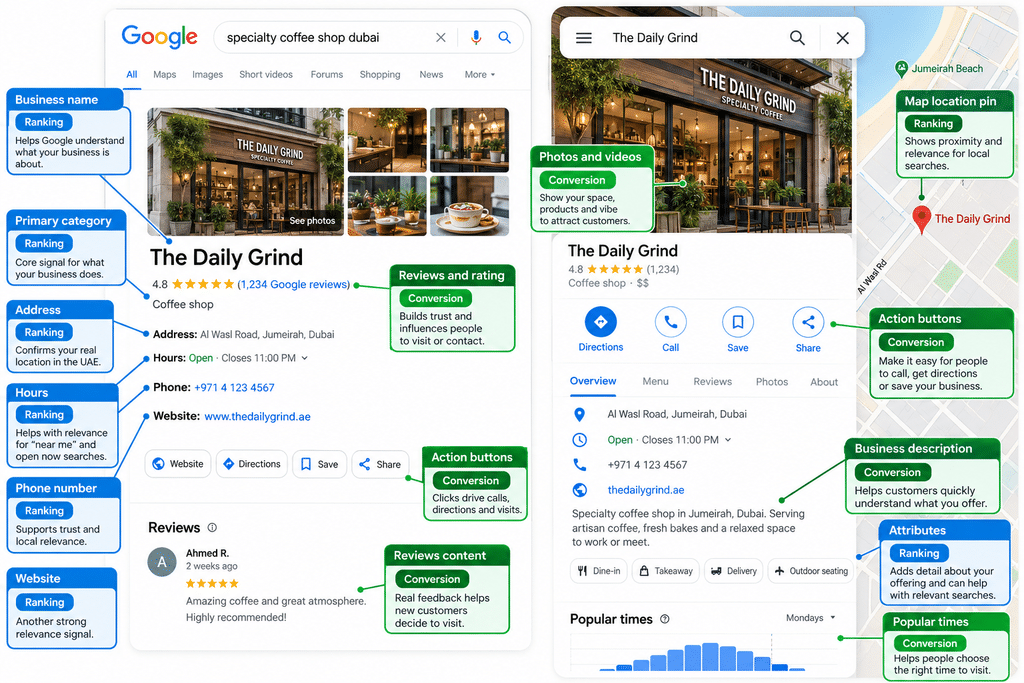
It also helps to know that the fields do different jobs. Your name, primary category, address and hours have the most effect on where you appear. Your description, photos, updates and review replies mostly decide whether a searcher picks you. The table further down shows which is which. If your time is short, get the ranking fields right first.
How Google picks the Dubai map pack: relevance, distance and prominence
In short: Google ranks local results on three things: how well your profile matches the search, how close you are to the searcher, and how well known your business is. You cannot pay for a better position in these organic local results.
Google explains this on its own help page, Tips to improve your local ranking on Google:
- Relevance is “how well a Business Profile matches what someone is searching for.”
- Distance is “how far each business is from the customer who’s searching.”
- Prominence means “how well-known a business is.” Reviews, links and mentions across the web feed into this.
The same page is clear on one point: “There’s no way to request or pay for a better local ranking on Google.” Ads can appear above the map, but the map results themselves are earned.
Local SEO specialists add more detail. In Whitespark’s 2026 Local Search Ranking Factors survey of 47 experts, the top five factors for the map pack were:
- Primary Google Business Profile category
- Distance between the searcher and the business
- Keywords in the business title
- A physical address in the city of the search
- Being open at the time of the search
Four of the five are set in your profile. You cannot move closer to every customer, but you can get the category, name, address and hours right. Our guide to local SEO in Dubai explains how the profile fits with your website, citations and content.
Before you start: is your UAE business eligible?
In short: You need a real place where you meet customers, or a real area you serve, plus staff during your stated hours. Virtual offices and PO Boxes do not qualify. Co-working desks only qualify with permanent signage and staff.
Many UAE profiles fail here, before anyone writes a description. Google’s guidelines for representing your business set the rules.
Match the name on your trade licence
Use the name customers see on your signage, website and documents, which in the UAE should be the trade name on your licence. Google says: “Including unnecessary information in your business name isn’t permitted.” That rules out adding “Best Dubai” or a list of services to the name.
If your trade name and shopfront name differ, fix that before you verify.
Mainland, free zone and co-working offices
A mainland or free zone licence does not change eligibility on its own. What matters is whether customers can visit you, or you go to them. A clinic in Dubai Healthcare City or a showroom in Dubai Design District can list its address like any shop.
Shared offices are different. Google says businesses “can’t list an office at a co-working space unless that office maintains clear signage.” You also need to be staffed during business hours. A flexi desk with no sign on the door will usually fail.
Virtual offices and PO Boxes
A rented address where the business doesn’t operate, “also known as a virtual office,” is not eligible. It also says “P.O. boxes or mailboxes located at remote locations aren’t acceptable.”
A PO Box is fine for your letterhead, but not for your profile.
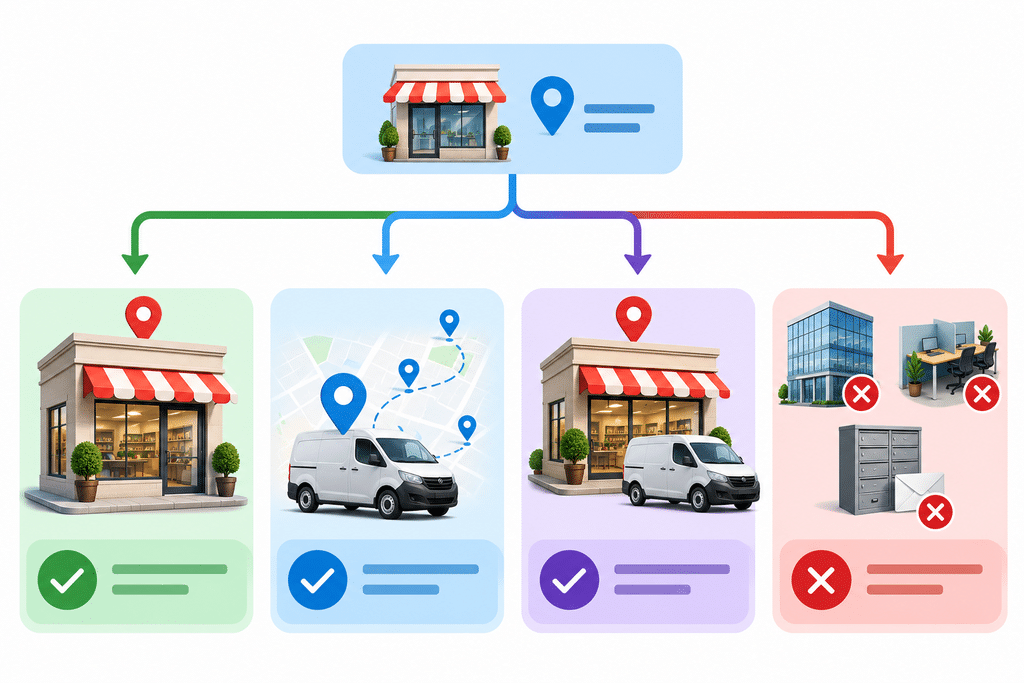
Storefront or service-area business?
- Storefront: customers come to you. Show your address. Restaurants, clinics, salons and showrooms fit here.
- Service-area business: you go to customers. Hide your address and list the areas you cover. Cleaners, movers, AC repair and home tutors fit here.
- Hybrid: customers can visit, and you also travel to them. Show the address and add service areas.
Google lets you add up to 20 service areas. It recommends not going further than about two hours’ driving time from your base. For a Dubai business, listing every emirate will rarely help.
If you run branches in more than one emirate, read this guide first and then our Google Business Profile guide for multi-location businesses.
How to set up and verify your profile in the UAE
In short: Create the profile at business.google.com, enter the details exactly as they appear on your licence and signage, then complete the verification Google offers. In the UAE that is often a short live video showing your location, your signage and an area only staff can access.
The order we follow:
- Search Google Maps for your business first. If a listing already exists, claim it rather than creating a duplicate.
- Sign in to Google Business Profile with a company Google account, not a staff member’s personal one.
- Enter your name exactly as it appears on your signage.
- Choose your primary category (more on this below).
- Add your address, or hide it and add service areas.
- Add a local phone number and your website.
- Complete the verification method Google shows you.
- Once verified, add a second owner or manager so you never lose access when someone leaves.
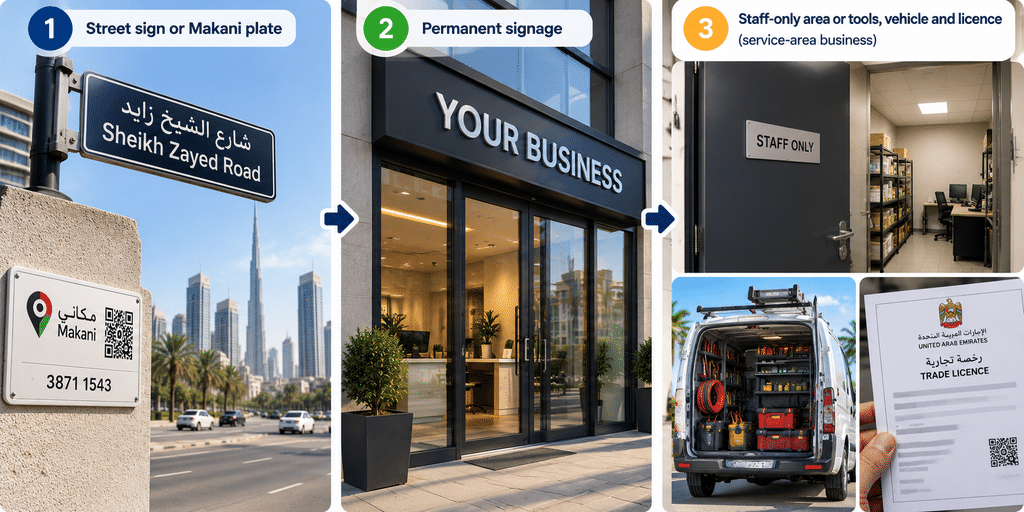
Video verification: what to film
Google’s page on verifying with a video recording lists three things to show. For a storefront, they are:
- Your location: “street signs, building numbers, nearby businesses, or familiar places around your business.”
- Proof the business exists: signage with your name “clearly printed on a permanent fixture,” matching the profile.
- Proof you manage it: areas only staff can reach, such as a till, kitchen or stockroom.
Service-area businesses show landmarks at their base, their tools or branded vehicle, and themselves doing the work. A permit or utility bill in the profile name also counts.
The video must be at least 30 seconds, recorded live on a phone, and “an unedited, unique, and complete recording with no breaks.” Do not show ID numbers, bank details or other people’s faces.
A practical Dubai tip: start outside, film the building name and the Makani plate by the entrance, then walk in without stopping. One continuous shot covers all three.
Why postcards often fail in Dubai
Some businesses are still offered a postcard. Most UAE mail goes to PO Boxes rather than street addresses, so a postcard sent to a building address often never arrives. If Google offers video or another option, use it.
Writing a UAE address Google can match
UAE addresses rarely follow the street and number format Google expects, so be consistent:
- Use the building name, floor and unit, then the street and area, for example “Office 1204, Building Name, Street, Business Bay, Dubai.”
- Place the map pin on your actual entrance, not the middle of the tower.
- In Dubai, your building’s Makani number is a 10-digit code for the exact entrance. Use it to check that your pin is in the right place.
- In Abu Dhabi, the Onwani system gives buildings a number and streets a name.
Whatever format you choose, use the same one on your website, your directory listings and your invoices.
Name, categories and services: the fields that move rankings
In short: Use your real trade name, choose the single primary category that best describes your main service, add only a few additional categories, and list your services in the words customers use. These choices shape which searches you can appear for.
Your business name
Whitespark’s September 2026 study of more than 1.4 million listings found that keywords in a business name go with more top-three map pack appearances. That is a correlation, and it is why so many profiles stuff their names. Do not copy them. Google forbids extra words in the name, and keyword names often lead to suspension. If a keyword really belongs in your brand, change the trade name on your licence and signage first, then update the profile.
Primary and additional categories
Local SEO experts rate the primary category as the top map pack factor (Whitespark 2026). Google’s category help page says to “select a primary category that best describes your business.” You cannot invent your own.
Additional categories cover other departments or services. Google advises using “a few categories” and warns, “Do not select a category for every product or service.” A dental clinic might choose “Dentist” as primary and add “Cosmetic dentist” and “Pediatric dentist.”
A simple way to choose: search your main service in Google Maps, open the top three competitors and note their primary categories. Then pick the most specific one that is true for you.
Services and products
In the services section, use the phrases customers type, such as “AC duct cleaning” rather than “HVAC hygiene solutions.” Add prices where you can. Retailers and restaurants can also add products or a menu.
| Field | What to enter | UAE note | Mainly affects |
|---|---|---|---|
| Business name | Your real trade name | Match the trade licence and signage | Ranking |
| Primary category | The one most specific true category | Check what top local competitors use | Ranking |
| Address or service area | Building, unit, street, area | No PO Boxes or virtual offices | Ranking |
| Opening hours | Regular customer-facing hours | Add Ramadan and Eid special hours | Ranking |
| Description | What you do, for whom, where | Plain language; keep it factual | Conversion |
| Photos and videos | Real images of place, team, work | No stock images | Conversion |
| Updates | Offers, news, events | Post in English and Arabic if your customers do | Conversion |
| Reviews and replies | Genuine reviews, polite replies | Reply in the language of the review | Both |
Description, hours, attributes and links: the details that win the click
In short: Write a clear, honest description, keep hours accurate including special hours, tick every attribute that is true, and add tracked links to your website and booking page. These details help a searcher pick you once you appear.
The description
Write it for a person, not for ranking. A simple structure: one sentence on what you do, one on who it is for, one on what makes you different, and one on the areas you cover. Mention your main services once, and skip keyword lists, links and “best in Dubai” claims.
Opening hours, Ramadan and Eid
Being open at the time of the search is one of Whitespark’s top five expert-rated factors. That makes hours a ranking field, not admin.
- Set your regular hours to match the times customers can reach you.
- Add special hours for Ramadan, Eid Al Fitr, Eid Al Adha, National Day and other public holidays before they start.
- Check your weekend. The federal government moved to a Saturday and Sunday weekend in 2022, and many companies followed, but not all. Show your real days.
Attributes and links
Attributes are the tick boxes, such as wheelchair access or free Wi-Fi. Only select the ones that are true.
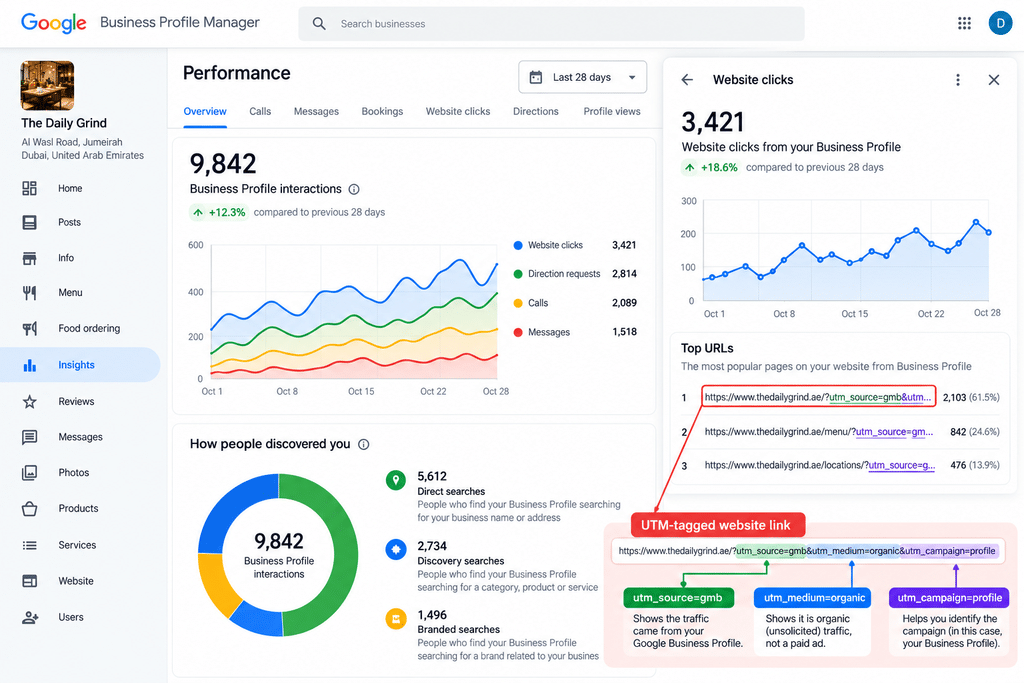
For links, add your website, and a booking or menu link if you have one. Add UTM tags to the website link, for example ?utm_source=google&utm_medium=organic&utm_campaign=gbp. That lets you see profile visits separately in Google Analytics 4.
Photos, videos and updates that keep a profile active
In short: Upload real photos of your premises, team and work, add short videos, and post updates on a rhythm you can keep. Fresh, genuine content helps people choose you and shows them the business is active.
Google says you can “tell the story of your business with photos and videos.” People want to know what they will find when they arrive, so start with the entrance, the inside, your team at work, and your products, dishes or finished jobs. Add your logo and a cover image. Use real photos, not stock images, plus short phone videos of a walk-through.
Updates are short posts for offers, new services, events and seasonal hours. There is no official posting rule, so pick a pace you can keep, such as one a week. If your customers speak Arabic, post some updates in Arabic as well.
Reviews: getting more, replying well and staying inside the rules
In short: Ask every customer for a review in the same way, reply to every review in the language it was written in, and never offer rewards or filter who you ask. Recent, genuine reviews build prominence and persuade searchers.
Reviews shape what buyers decide. BrightLocal’s Local Consumer Review Survey 2026, a survey of 1,002 US adults, found that 97% of consumers read reviews for local businesses. It also found that 74% only care about reviews written in the last three months, and 89% expect owners to respond. The sample is American, but Google itself says “Positive reviews and helpful replies can help your business stand out.”
How to ask for reviews
Ask when the job is done or the meal is over. Send your direct review link by WhatsApp or SMS, or print a QR code at the counter. Ask everyone, not just the customers you expect to be happy.
What Google prohibits
Google’s Maps content policy bans several common practices. You may not:
- Offer incentives, such as discounts or gifts, in return for reviews.
- “Discourage or prohibit negative reviews, or selectively solicit positive reviews from customers.” This is often called review gating.
- Post reviews based on a conflict of interest, such as staff reviewing their own employer.
- Post content on a competitor’s listing to damage its reputation.
Breaking these rules can lead to removed reviews or a restricted profile.
Replying in English and Arabic
Reply to every review, good or bad, and keep it short. Thank people by name and mention what they bought where it is natural. For a negative review, apologise, state the facts calmly and offer to talk privately. If a review is in Arabic, reply in Arabic. If you believe a review is fake, report it through your profile, then reply politely anyway, because other customers will read your answer. For a wider view of reviews as part of your brand, see our post on building a customer review strategy.
What changed in 2026: Q&A, the Ask button, Ask Maps and AI Overviews
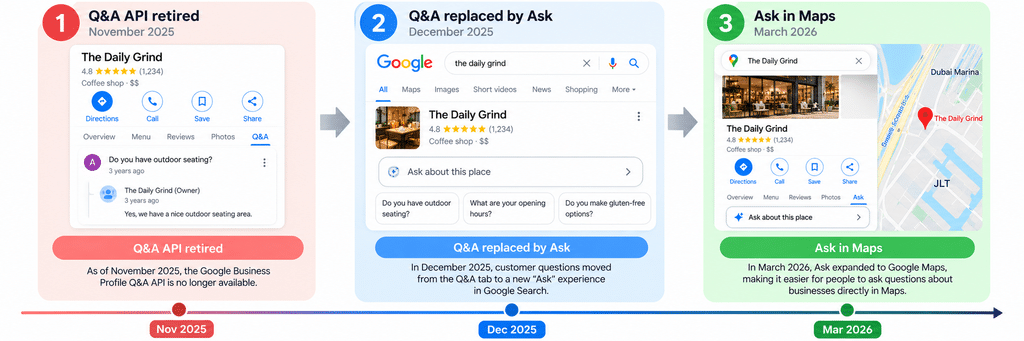
In short: Google removed the old Q&A section from Business Profiles and replaced it with an AI “Ask” button that answers from your profile details and reviews. Gemini also powers Ask Maps. The more complete and accurate your profile, the better these AI answers describe you.
Older guides still tell you to fill in your Q&A section. That advice is out of date. According to PPC Land, the timeline was:
- 3 November 2025: the Q&A API stopped working.
- 3 December 2025: Google confirmed Q&A was being removed from Maps and replaced by an AI-powered Ask button. Answers come from information the business has provided and from reviews.
- 12 March 2026: Google launched Ask Maps, a conversational search inside Google Maps powered by Gemini. It rolled out first in the US and India, according to GSMArena.
Check what is live in the UAE before you plan around either feature. The groundwork is the same either way.
AI Overviews on normal search pages work in a similar way; see how Google AI Overviews choose their sources. To give these AI answers good material:
- Fill in services, attributes and hours so the AI has facts to use.
- Put a clear FAQ on your website that answers the questions customers used to ask in Q&A.
- Encourage reviews that mention the specific service, since review text feeds the AI answers.
How to avoid a suspension, and what to do if it happens
Common suspension triggers are keyword names, ineligible addresses, sudden address changes or duplicate listings. If it happens, fix the cause, then file one appeal with documents that match your profile name and address. Do not create a new profile.
Common triggers include:
- Keywords or locations added to the business name
- A virtual office, flexi desk without signage, or PO Box as the address
- Changing the address soon after verification, often during an office move
- Two profiles for the same business
Google’s page on fixing suspended profiles says “Appeals can only be submitted once,” so prepare properly. Useful evidence includes your business registration, licence, tax certificate and utility bills. Check that “the business name and address match the profile” you are appealing for.
And do not start again: “Do not create a new Business Profile for the same business.”
How to measure your Google Business Profile results
Use the performance report in your profile to track views, searches, calls, website clicks and direction requests. Add UTM tags to see profile traffic in Google Analytics 4, and use a rank grid to check where you appear across your area.
Google’s performance report shows the metrics that apply to your business:
| Metric | What it tells you | Where to find it |
|---|---|---|
| Views | How many people saw your profile on Search and Maps | Performance report |
| Searches | The terms people used to find you (updated monthly) | Performance report |
| Calls | Taps on your call button | Performance report |
| Website clicks | Taps on your website link | Performance report and GA4 |
| Directions | Requests for directions to you | Performance report |
| Bookings | Completed bookings, where a booking provider is set up | Performance report |
| Map position by area | Where you rank from different points in your city | A geo-grid rank tracking tool |
Compare the trend month to month, not week to week. Read the search terms: if people never find you for your main service, check your category. And because many UAE customers call or WhatsApp instead of filling in forms, call tracking shows which calls came from your profile.
Category and name fixes usually show sooner than gains from reviews. If you are still not in the map pack after a few months, the cause is often outside the profile: your website, citations or local links. That is where our local SEO services team can help with an audit.
Frequently asked questions
How much does it cost to optimise a Google My Business profile?
The profile itself is free. You pay only if you hire someone to manage it. Agencies usually price profile work as part of a local SEO retainer. Our guide to what local SEO costs in the UAE puts a typical single-location package at AED 1,500 to 3,500 a month, with Google Business Profile management included. Google Ads, including ads in Maps, is a separate paid product.
How can I optimise my Google Business Profile?
Verify it, use your real trade name, choose an accurate primary category, set correct hours and service areas, add real photos and services, and collect and reply to genuine reviews. Then check the performance report each month.
How do I get more views on my Google Business Profile?
Complete every relevant field, especially categories and services, so you match more searches. Keep hours accurate and add fresh photos, updates and reviews.
How do I promote my Google Business Profile?
Link to it from your website, email signature and WhatsApp messages, and share your review link after every sale. For paid reach, Google Ads can show your business in Maps.
How much does Google charge to promote your business?
Nothing for the profile. Google Ads works on a bid basis, so you set your own budget and pay for clicks or calls. Google says there is no way to pay for a better organic local ranking.
Is a Google Business Profile worth it?
For any business that serves customers locally, yes. It is free, and it brings calls and direction requests you can measure.
Can I do SEO on my own?
Yes, you can handle most profile work yourself by following this guide. Outside help is most useful when you are stuck on verification, recovering from a suspension, or competing in a crowded category.
Why is my business not showing on Google Maps after verification?
New profiles can take time to appear. Search your exact business name first. If nothing shows, check for a suspension notice or a duplicate listing. If you show for your name but not your service, check your primary category, pin and hours, and test from near your location. Service-area profiles do not show a street address.