
Virtual Staging for Branding: Immersive Visual Experiences in a Digital World
Introduction
Virtual staging for real estate is no longer a luxury reserved for high-end properties—it’s fast becoming a staple in modern property marketing strategies. As homebuyers increasingly rely on online listings to evaluate properties before scheduling a visit, first impressions matter more than ever. In fact, according to the National Association of Realtors (NAR), 97% of buyers use the internet in their home search, and staged homes can sell up to 73% faster than non-staged counterparts (source: https://www.nar.realtor).
However, traditional home staging is often expensive, time-consuming, and logistically challenging. From moving furniture in and out to hiring designers, the process can cost thousands of dollars and require days or even weeks of preparation. In contrast, virtual staging leverages digital technologies—often powered by artificial intelligence (AI)—to create hyper-realistic interior designs with just a few clicks, drastically reducing turnaround time and costs.
This shift has opened doors for a variety of professionals in real estate, including:
- Investors who flip multiple homes per year and need fast, consistent imagery,
- Luxury agents seeking photorealistic design aesthetics to attract high-end buyers,
- Rental managers marketing empty units with limited budgets and fast turnover timelines.
While the benefits are clear, virtual staging still faces skepticism. Some users fear it will look “fake,” while others worry about the learning curve or software costs. This guide aims to break through that uncertainty.
We’ll compare the latest AI-powered virtual staging tools, evaluate them by use case, and address the most pressing concerns—from affordable virtual staging options to how to use virtual staging apps effectively. Expect a practical, tool-oriented review with professional insights, data from trusted industry sources like Zillow and Realtor.com, and side-by-side visuals that show just how transformative virtual staging can be.
And most importantly, we’ll explore how virtual staging plays a crucial role in Visual Branding & Design—building a consistent visual narrative that strengthens brand identity across every listing.
What Is Virtual Staging—and Why It Matters
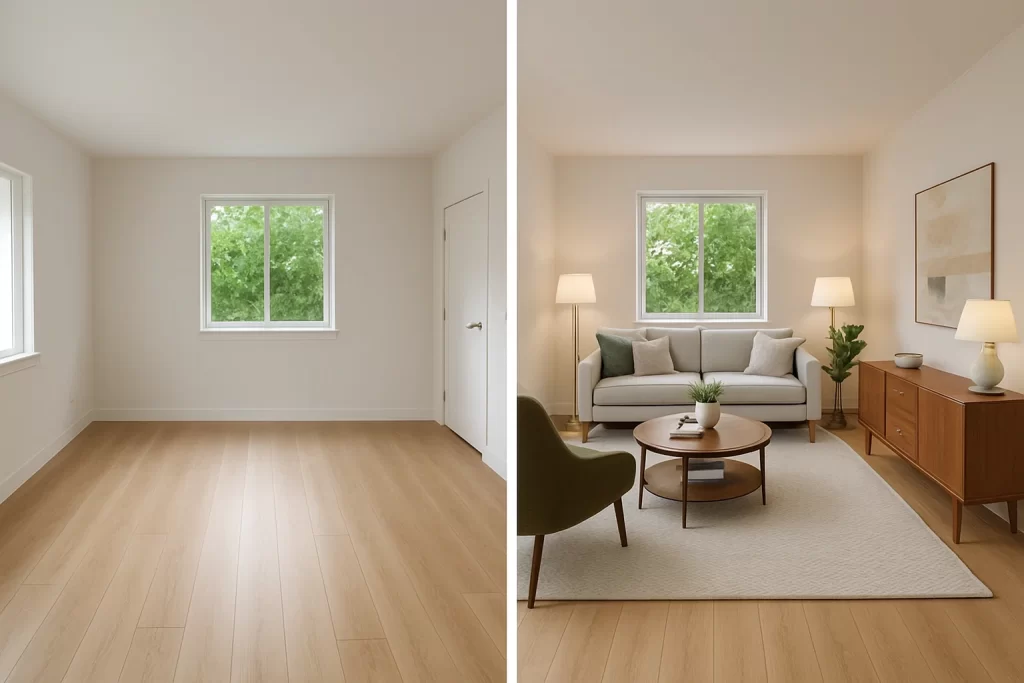
At its core, virtual staging for real estate is the process of digitally furnishing and decorating property photos to make empty or outdated spaces more appealing to potential buyers. Unlike traditional staging—which involves hiring movers, renting furniture, and coordinating with interior designers—virtual staging is done entirely online, often within 24 to 72 hours. The result is a highly visual, emotionally resonant listing that helps buyers envision themselves in the space.
This matters for one simple reason: people buy what they can picture themselves living in. And in a crowded real estate market, listings that appear empty or cluttered are often overlooked. A virtually staged image, when done well, not only grabs attention but also tells a story. It’s a subtle form of visual storytelling that can increase perceived value, boost engagement, and even shorten time on market.
From Empty Room to Market-Ready: How It Works
The process typically involves
- Uploading high-resolution images of an empty or unfurnished space.
- Selecting a design style or theme (modern, farmhouse, luxury, etc.).
- Adding digital furnishings and décor using AI-driven tools or professional editors.
- Receiving final staged images ready to use in MLS listings, social posts, and brochures.
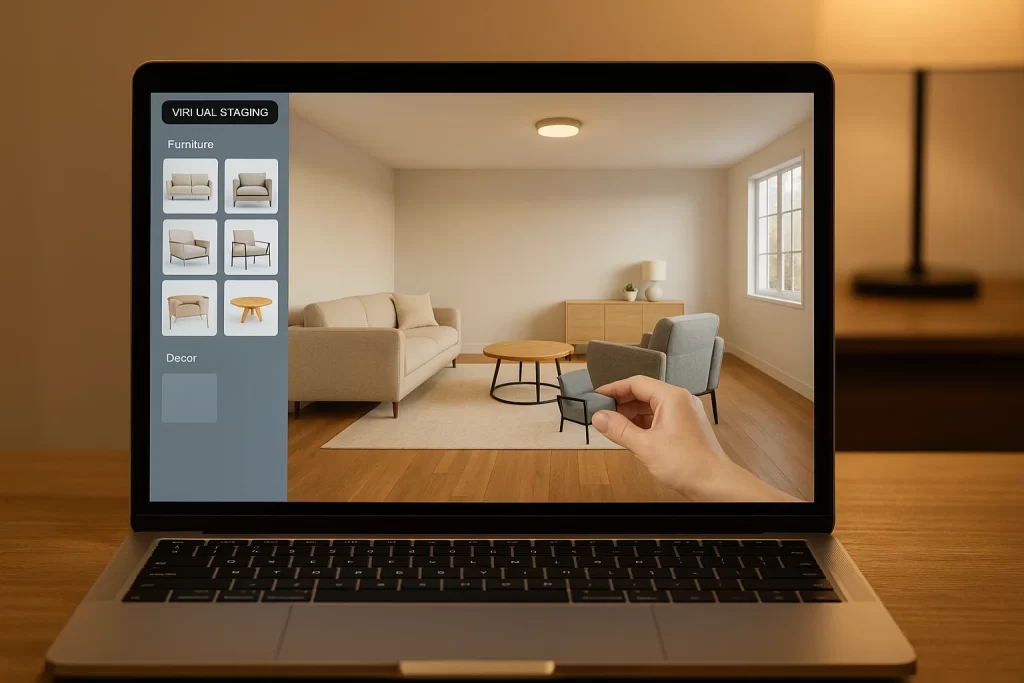
Some tools now include 3D visualization, drag-and-drop interfaces, and even AI furniture placement, making the process accessible to non-designers. For agents overwhelmed by design choices, many platforms offer curated furniture packs and automated recommendations based on room size and function.

The Business Case: Staging Without the Overhead
Traditional staging can cost between $1,500 to $5,000 per home, depending on size, location, and duration. That figure increases when dealing with luxury properties or multiple units. Virtual staging, on the other hand, averages $20–$50 per image, offering up to 90% cost savings with faster turnaround and zero logistical complexity.
That’s especially important for
- Remote or out-of-state sellers who can’t coordinate physical staging.
- Rental property owners wanting to minimize vacancy between tenants.
- Realtors managing large portfolios who need scalable, consistent branding across listings.
This cost-efficiency aligns perfectly with modern demands for speed, clarity, and convenience in the property-buying journey.
Addressing the Skepticism: “Is It Fake?”
One of the top user pain points is a fear that virtual staging looks artificial or deceives buyers. But today’s tools have come a long way from cartoonish renderings. With AI-powered photorealism, lighting-matching algorithms, and perspective correction, many virtually staged images are nearly indistinguishable from real photos.
That said, transparency is key. Experts recommend disclosing staged images and labeling them clearly. A leading voice on Realtor.com writes:
“Buyers don’t mind if a room is virtually staged—as long as you’re honest about it. They just want inspiration, not illusions.”
And it’s not just about honesty—it’s about empowering visual decision-making. With properly staged rooms, buyers get a clear sense of scale, layout possibilities, and flow—making them more likely to schedule a showing.
AI-Powered Tools: Faster & Smarter
The rise of AI in virtual staging has redefined what’s possible in real estate marketing. What once took days of human labor can now be done in minutes—with greater precision, lower cost, and more customization. As AI virtual staging tools continue to mature, they’re offering realtors, investors, and designers unprecedented creative control without the typical design bottlenecks.
These smart tools don’t just save time—they optimize the entire staging workflow from image enhancement to furniture placement, even suggesting design styles that resonate with specific buyer personas.
The Evolution: From Photoshop to Machine Learning
Traditional virtual staging often relied on manual editing—painstaking hours in Photoshop to render a single room. But AI has ushered in a new era where:
- Furniture is auto-positioned based on room dimensions.
- Styles are suggested by machine learning models trained on high-converting real estate photos.
- Shadows and lighting are calculated dynamically to match natural angles.
- Even wall colors and flooring can be swapped with 1-click design suggestions.
Companies like Collov AI, roOomy, and Virtual Staging AI have embraced these technologies to streamline editing without sacrificing realism.
“With AI, we can stage a 3-bedroom home in under an hour—something that would’ve taken 2–3 days before,” says James L., a top-producing agent in Atlanta.
Why It Matters for Time-Crunched Realtors
Time is a critical resource for agents juggling dozens of listings. AI-powered tools drastically reduce the staging workflow:
- Upload → Auto-staging → Publish: all within 60 minutes.
- Bulk options allow you to process entire photo sets simultaneously.
- Some platforms even offer MLS-ready exports optimized by image resolution and layout guidelines.
This speed empowers agents to list homes faster, capitalize on market timing, and avoid unnecessary days on market.
Customization Without Complexity
Contrary to the misconception that AI tools are rigid, today’s platforms offer extensive customization:
- Choose from design packages (Modern, Scandinavian, Boho, etc.).
- Rearrange furniture pieces or swap color palettes in real time.
- Preview multiple design options side-by-side before committing.
And for the tech-wary? Most tools offer simple onboarding and concierge editing services for realtors who prefer a hands-off approach.
One Reddit user shared:
“I was skeptical, but the AI tool auto-furnished my entire listing in less than 20 minutes. I booked two showings within hours of posting.”
Affordability and Scalability
The biggest win? Cost reduction. Where traditional staging could easily run into thousands, AI-driven virtual staging tools average between $15–$40 per room. Plus, many platforms now operate on subscription or credit models, making them scalable for brokers managing multiple listings monthly.
Choosing the Right Virtual Staging Tool: Use Cases & Features
Not all virtual staging software is created equal. With dozens of platforms on the market—each offering different features, pricing, and visual outputs—real estate professionals must choose tools that align with their property types, buyer expectations, and business models.
This section helps you match the right virtual staging tool to your use case, based on speed, quality, customization, and price. Whether you’re flipping homes, marketing luxury estates, or filling vacancies in rentals, there’s a staging solution designed for your workflow.
1. For Investors & Flippers: Speed and Scale Matter
Customer Challenges : Investors managing multiple properties often need fast turnarounds and low costs—without sacrificing presentation quality.
Best Fit Tools
- Platforms like Virtual Staging AI or ApplyDesign.io offer bulk upload capabilities, batch edits, and rapid delivery (under 24 hours).
- Look for tools with preset templates that can be reused across listings to maintain visual consistency and branding.
“We flipped three condos in one month. Virtual staging let us relist each one in 48 hours after photos,” says Priya M., an Arizona-based investor.
2. For Luxury Real Estate: Premium Design and Photorealism
Customer Challenges : High-end buyers expect a refined visual experience that reflects the property’s unique appeal. Cheap-looking staging won’t cut it.
Best Fit Tools
- Use platforms like roOomy, BoxBrownie, or Barion Design—known for photorealistic finishes, luxury design catalogs, and human designer oversight.
- Opt for staging that supports multiple camera angles, customized lighting schemes, and layered textures.
3. For Rentals & Budget-Conscious Listings: Affordability with Impact
Customer Challenges : Rental listings need to stand out in crowded markets without inflating marketing spend.
Best Fit Tools
- Choose user-friendly tools like VisualStager, VSH Media, or PadStyler, which offer drag-and-drop interfaces and mobile app support.
- Many allow DIY staging from your phone, making them perfect for small property managers or agents on the go.
A Reddit landlord wrote:
“Used a mobile app to stage my rental in 10 minutes. Got three lease applications in one day. Game-changer.”
Expert Tips & Real Realtor Use Stories
While technology continues to evolve, the most compelling virtual staging strategies still rely on real-world experience. In this section, we blend expert advice, sourced quotes, and authentic use stories to help you stage smarter—not harder. These insights come from agents who’ve tested multiple tools, learned from costly mistakes, and discovered how to align virtual staging with what actually sells.
Learn From the Pros: What Top Agents Do Differently
- Stage for the Demographic, Not Just the Room
“Don’t just fill the space—tell a lifestyle story,” says Olivia Tran, a top agent in Los Angeles.
For example, a studio condo near a university might feature minimalist, modern furniture to appeal to Gen Z buyers, while a suburban four-bedroom should evoke family warmth with traditional pieces. - Always Label Staged Images Clearly
Transparency builds trust. Top agents include disclaimers like “virtually staged for inspiration purposes” in image captions or listing notes.
According to a recent Zillow study, honesty around staging increases buyer confidence by 37%. - Use Staging to Overcome Layout Challenges
“I listed a home with a weirdly narrow den. Virtual staging made it look like a productive home office. That room got the most attention,” says Javier B., Miami-based realtor.
Use Story: Virtual Staging Saves the Sale
When Toronto-based agent Monica Singh listed a luxury home in winter, she faced a challenge: the property had already been vacant for months, and the weather was gray and uninspiring.
“The photos just weren’t doing it justice. So I virtually staged it with warm wood tones, plush couches, and golden lighting. I had new offers within the week. One buyer even asked if they could buy the furniture.”
This story exemplifies the power of emotional appeal through design, something that empty rooms simply can’t achieve.
The Ground Truth
On r/RealEstate and r/Realtors, many agents have shared virtual staging wins and pitfalls:
- “I used to think it was gimmicky, but now I won’t list without it. One $30 image helped me close a $900K deal.”
- “The AI tools look great, but for high-end listings, I still rely on human editors. They just get the lighting right.”
- “Don’t over-stage. Keep it simple. One chair, one plant, one table. Leave some room for the buyer’s imagination.”
These authentic voices confirm what experts already know: virtual staging works when it’s strategic, tasteful, and audience-aware.
Cost Comparison & ROI Analysis
One of the most compelling reasons to adopt virtual staging for real estate is the dramatic difference in cost compared to traditional staging. For many agents and sellers, this isn’t just about saving money—it’s about making smarter marketing investments that deliver higher returns.
This section breaks down real-world staging expenses, compares them side-by-side, and explores how virtual staging unlocks ROI potential across various listing types.
Traditional Staging Costs: High Impact, Higher Overhead
Physical staging includes furniture rental, delivery, setup, and monthly storage fees. Here’s a typical pricing breakdown:
- Initial design and setup: $1,500–$3,500
- Furniture rental (per month): $500–$1,500
- Extended contracts: Add $1,000+ if the property doesn’t sell quickly
That means a single staged listing can cost $3,000 to $6,000+, depending on market, property size, and duration.
For multi-unit developers, rental managers, or flippers managing multiple listings, these numbers can snowball quickly. Plus, delays in setup or removal can stall your ability to relist or pivot the property.
Virtual Staging: A Fraction of the Price
Modern virtual staging platforms offer:
- $15–$50 per image, depending on the level of customization and photorealism
- Subscription packages or bulk pricing for agencies and teams
- Zero storage, delivery, or wait time
Example ROI
- A staged photo set (5 rooms) costs ~$150 with AI software
- Same home with physical staging? $3,000 minimum
That’s a 95%+ cost reduction, with comparable visual impact—especially in online listings where buyers make split-second decisions based on imagery.
ROI in Action: Listing Performance Metrics
According to the National Association of Realtors (NAR)
- 82% of buyers’ agents say staging makes it easier for buyers to visualize the property as their future home.
- Staged listings sell 3x faster and can command 1%–10% higher sale prices, especially in competitive markets.
That means a $500 investment in virtual staging can yield $5,000–$20,000+ in return, depending on property price and listing strategy.
When to Spend More (and When Not To)
Virtual staging ROI also depends on choosing the right level of service:
- Go premium for high-end or luxury homes, where visual aesthetics matter most.
- Use budget AI tools for rentals, flips, or when speed trumps perfection.
- Avoid over-staging. Too many staged rooms can feel artificial—pick the kitchen, living room, and main bedroom as top-impact zones.
“We tested 3 images versus 10 per listing. No measurable ROI after the 5th photo,” reports a brokerage from Portland in a Realtor.com case study.
SEO Angle: Incorporating Virtual Staging in Listings & Content
Virtual staging for real estate is more than just visual—it’s also a powerful SEO asset. With 97% of homebuyers starting their search online, realtors and brokerages who understand how to leverage virtual staging in their content strategy gain a measurable edge.
This section explores how to use virtually staged assets to boost your SEO, attract organic traffic, and build stronger listing visibility across platforms like Zillow, Realtor.com, and Google Search.
Why Visuals Matter for SEO
Search engines are getting smarter at interpreting images, alt text, and user engagement. Virtual staging improves:
- Click-through rates (CTR) on listing thumbnails
- Dwell time, as users stay longer on visually engaging pages
- Image search optimization, especially when paired with keyword-rich file names and captions
According to Virtuance, listings with professional images—including staged ones—receive 118% more views than non-staged counterparts.
Strategic Content Formats Using Virtual Staging
Virtual staging assets can be repurposed to support a wide range of content types:
- MLS listings with keyword-rich descriptions and properly tagged images
- Blog content showcasing staging case studies, e.g., “How virtual staging helped me sell a $1M home in 4 days”
- Social media carousels comparing “Before vs After” photos
- YouTube walkthroughs with embedded staged imagery
- Email marketing campaigns featuring staged designs to re-engage cold leads
Each of these formats gives search engines more content to index—especially when optimized with semantic-rich keywords and relevant internal links to your site or listings.
Local SEO: Geotagging and Hyperlocal Keywords
To attract buyers searching by city or neighborhood, use hyperlocal keywords alongside your staged visuals:
- “Virtual staging in Chicago condos”
- “Best virtual staging for rentals in Miami”
- “Affordable virtual staging service near me”
Make sure your image files include
- Descriptive names (e.g.,
virtual-staging-modern-condo-chicago.jpg) - Alt text with phrases like “AI virtual staging of a downtown Los Angeles loft”
- Embedded geolocation metadata when possible
These enhancements improve visibility in Google Images, Maps, and property-specific search queries.
FAQ
1. How much does virtual staging cost compared to physical staging?
On average, physical staging costs between $3,000–$6,000 per home, especially for full-furniture setups or extended time periods. In contrast, virtual staging costs around $20–$50 per image, with discounts for volume.
That’s a 90–95% savings, which can be reinvested into advertising, social media, or better listing photography.
2. Is virtual staging realistic? Will buyers notice it’s fake?
Modern tools—especially those powered by AI—produce images so photorealistic, most buyers don’t question them. However, realism depends on:
- Lighting accuracy
- Proportional furniture placement
- Consistency in flooring and wall textures
Pro tip: Be transparent. Label staged photos clearly and provide at least one “empty” version for comparison.
According to Realtor.com, transparency in digital editing improves buyer trust and increases lead quality.
3. How do I choose the best virtual staging tool for my needs?
It depends on your listing type:
- Investors or flippers should choose tools like ApplyDesign.io or Virtual Staging AI for speed and volume.
- Luxury agents should opt for Barion Design or roOomy, which specialize in high-end textures and lighting.
- Rental managers may prefer mobile tools like PadStyler for affordability and ease of use.
Always consider
- Turnaround time
- Design style catalog
- Support for revisions
- Pricing model (per image vs subscription)
4. Can I use virtual staging for rentals on a tight budget?
Absolutely. In fact, virtual staging is ideal for rental properties, where margins are tighter and staging turnaround needs to be fast.
Some budget-friendly platforms even offer DIY mobile apps with drag-and-drop furniture, ideal for staging on the go. Expect pricing between $10–$20 per image for most entry-level solutions.
5. Does virtual staging support edits or revisions?
Most reputable platforms offer at least 1 free revision per image, and some offer unlimited changes within a window (24–72 hours). Be sure to:
- Clarify revision policies upfront
- Provide accurate measurements and angles for best results
- Review design styles before ordering
Pro Tip: Some tools let you preview multiple designs before paying, which reduces the need for revisions.
Conclusion
Virtual staging for real estate is no longer a futuristic luxury—it’s an accessible, powerful tool for today’s fast-moving housing market. Whether you’re an investor flipping homes, a luxury agent marketing premium properties, or a landlord filling vacancies, virtual staging offers a flexible, cost-effective, and visually compelling solution.
This article showed how modern staging tools—particularly AI-powered platforms—are not only faster and cheaper but also tailored to your specific use case. You’ve seen how:
- Virtual staging drastically reduces marketing costs by up to 95%,
- Tools can be chosen strategically for investors, luxury homes, or rentals,
- SEO gains are unlocked by using staged assets across listings and content,
- Common buyer concerns around “fake-looking” images are resolved with realism and transparency.
You don’t need to be a design expert or tech whiz. You just need the right platform, a clear goal, and a desire to stand out in the crowded digital property marketplace.
The takeaway? Staging sells. Virtual staging sells faster—and smarter. Now it’s your turn. Explore the tools mentioned, experiment with styles, and bring your next listing to life digitally.